The mod-plugin-cookbook: using AI to create new plugins

Hi all,

Here’s something fun for the weekend.

For those who like using AI, here’s the mod-plugin-cookbook:
it lets MOD users easily build and push a working plugin into their
MOD units, starting from a plain-language description of what they
want to hear.

The procedure is simple:

  1. Discuss your sound design idea with the AI of your choice (Claude,
    ChatGPT, Gemini, others — any AI that can fetch URLs works). Give
    it the link to the cookbook. It will produce a single .mk file
    for you.
  2. Go to our Buildroot Cloud Builder
    and upload the .mk file from the previous step. You’ll need a MOD
    unit connected over USB to proceed.
  3. Tell the Builder to Build, then Install the plugin.
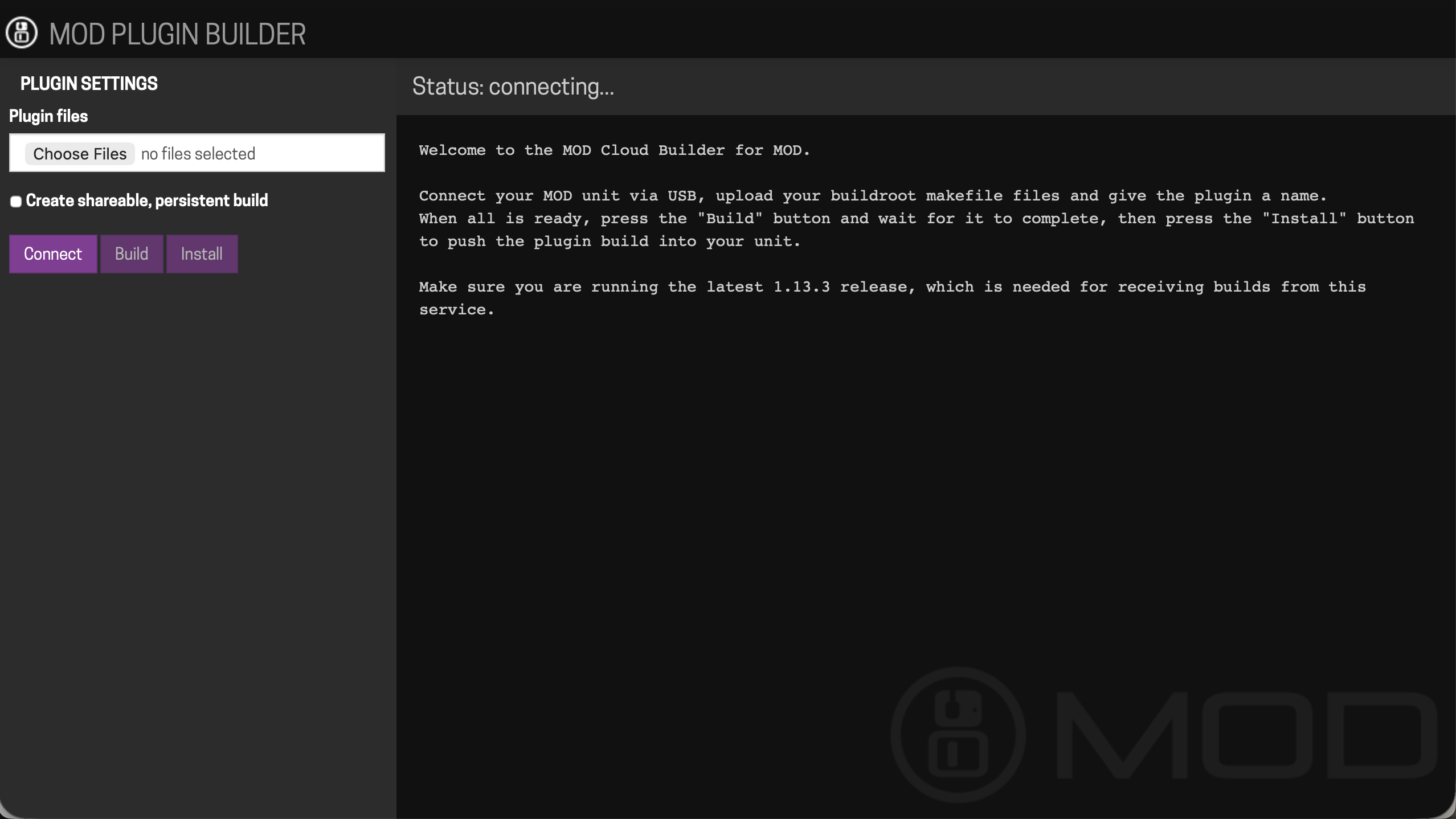
That’s it. The plugin should now show up in the Web UI :slight_smile:

Bonus: when uploading, you can tick the “shareable persistent
link” option. The builder gives you back a URL that anyone else with
a MOD unit can click to install the same plugin on their device.
Nice way to share what you made here on the forum or pass to friends
— a step toward community-driven plugins before they make it to the
Beta store.

I’ve tested this with a Tube Screamer, a CE-2 chorus, and a
bidirectional filter so far — all built and ran first time on my
Dwarf, across Claude and ChatGPT.

This is just a proto for a bigger idea — if it gets traction here, we’ll invest more
resources into it.

The current single-.mk-file model is appealing because
it’s simple and self-contained (the dev never has to push code
anywhere, the file carries everything), but it does come with limits:

  • One source file per plugin. Multi-file DSP code doesn’t fit
    cleanly.
  • No external libraries beyond DPF. So no fftw, no
    libsamplerate, no other deps.
  • No custom pedal face (no modgui). Plugins use the “tuna can”
    auto-generated UI on the unit.
  • No iteration. Editing means regenerating the whole .mk and
    re-uploading. Fine for trying ideas, painful for serious
    development.
  • Practical size limit around ~1000 lines of DSP code before the
    file gets unwieldy.

A “turn this into a real project” mode is the natural next step if
people want it — proper source tree, version control, ability to
iterate. I’d rather see what people actually do with the prototype
first before designing it.

In terms of FX creation, It doesn’t matter if you want to ask for a model of a specific pedal — Tube Screamer, CE-2, ProCo Rat — or have a more abstract
conversation about sound design (“a wavefolder that gets harsher as
it’s pushed”, “a chorus that doesn’t add lows”). That’s fully up to you and the AI you choose to work with.

Let me know how you feel about it. I think it’s very exciting :slight_smile:

Best wishes

Gianfranco, aka the MOD Father

11 Likes

Hi @gianfranco, that’s a lot of fun, I tried the simplified procedure with Gemini and it worked amazingly!!!

Thanks for this new capability!

3 Likes

Cool! Thanks, I was trying some things with opencode so this helps.

2 Likes

Bloody hell this definitely sounds like fun!

Actually scrap that it IS FUN!, got a couple of basic fx running so far. Just 2 things

1 - can we have a thread so we can post our designs (AI)

2 - how do we make nice custom GUI for our pedals

2 Likes

Glad to hear :slight_smile:

Sure. I’ve just whitelisted the upload of .mk files here in our forum, so we can post them. Here are some that I did.

ce2-chorus.mk (8.3 KB)
center-filter-resonant.mk (10.2 KB)
surfy-spring.mk (16.7 KB)
surfy-trem-spring.mk (20.5 KB)

I have edited the Neural Modelling category to include AI plugin making and also added a sub-category dedicated to it.

But before we start making lots of shares I think the Cookbook can be improved for that first.

That’s one of the improvements I want o make :slight_smile:

1 Like

Regarding the GUIs, I still use the good old MOD SDK :slightly_smiling_face:

https://github.com/mod-audio/mod-sdk

1 Like

me too :slight_smile:

but it too outdated now. I want to incorporate the same idea into the cookbook

3 Likes

As a non-developer, this is an amazing tool. I always wanted to try developing plugins but got discouraged by the whole process of installing the SDK etc. And this was only the first step!! Thank you for providing this.

4 Likes

Very glad to read it.

I am thinking on the evolution and I want to ask you. When working with the AI of your choice - Claude , ChatGPT, Gemini - do you use only the chat? Or do you advance to tools like Codex and Cowork, giving the AI access to folders in your filesystem?

I ask it because, in oder to evolve the system, one needs a file tree bundle structure instead of a single .mk file. Handling that via the chat becomes rather cumbersome.

I’m not there yet! :grinning_face: What I did is using the chat in VS Code (on Mac) with the Copilot AI agent available through a Github account. I’m thinking about subscribing to Claude though.

ok slight problem, Ive been busy building a few plugins whilst Ive been away from my dwarf. So this morning super excited to see my creations and I can’t connect to the cloud builder no matter what I do. The dwarf is seen by the editor on 192.168.51.1 as normal , the cloud builder will see my mk files but wont connect to dwarf. Done the usual different cables and even asked my new best buddy Claude who advised I change the insecure flag in chrome but to no avail.

Tried chome and edge so far. Im on windows 10

My dwarf is 1.13.5.3315 firmware

Any thoughts?

couple of my /Claudes creations to test for me

reverse-reverb.mk (12.8 KB)

reverse-reverb-1.mk (13.9 KB)

you can open the Web UI and it does authenticate with the MOD Cloud?

I am using Safari and it works fine.

Here are your two builds:

Reverse-Reverb: MOD Cloud Builder

Reverse-Reverb1: MOD Cloud Builder

sorry Gianfranco , I’m not sure what you mean? I have update all my plugins without a problem and it says my firmware is upto date if thats what you mean. I am able to create pedalboards as normal that transfer as expected to the dwarf instantaneously too. I tried the links that you gave me for my test plugins but still not connecting to the builder.

Don’t think I can use Safari on windows can I?

mmm… seems all ok on the cloud side then.

have you tried another browser? private window? clean cache?

Hi. I had similar problems with Windows browsers and solved them using Firefox.

1 Like

Cheers guys will try that later and report back. Thanks for you help so far, appreciate it

Up and running on Firefox!!!

1 Like

Also I ticked the shareable persistent build and it seems to have created for anagram as well as duo and duox. Does this work on anagram too then?

No. It gets built just because Anagram is listed in the list of targets of mod-plugin-builder, but it will not actually be able to install on the device.

I’ll see how to skip it.