I have a version based on Starless 17 that adds the following:
You can now map HMI, CC, CV and MIDI at the same time to a control.
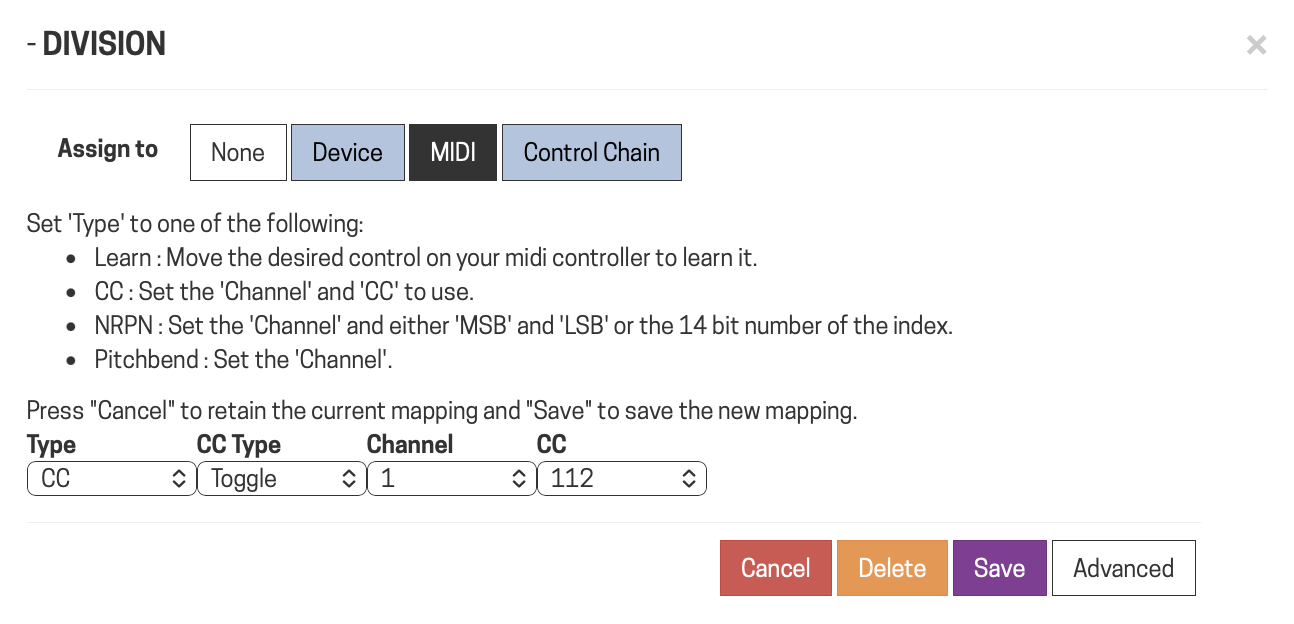
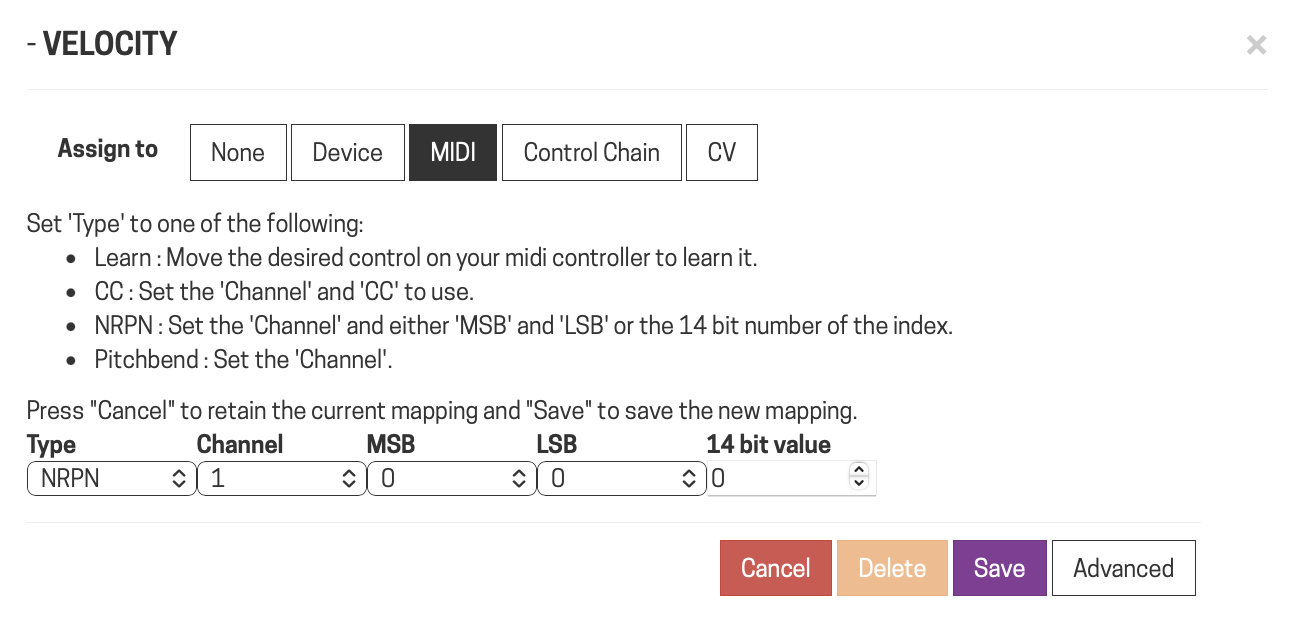
You can now directly map midi without using learn.
You can now change lists, plugin presets and snapshots from MIDI.
Midi buttons/switches are now supported.
Tap Tempo from MIDI buttons/switches.
So the idea is to get some people to test this out before it is merged into Starless. Do not try this on a device you are gigging with until we know there are no problems!
In the preferences you can turn the new features on and off, if they are turned off it should all work the same as Starless.
Any pedalboard saved when this is enabled will not be able to be loaded if you then disable it, so save a copy of the pedalboard instead of overwriting it. Pedalboards saved should always be able to be loaded into the normal Starless and into the MOD release. But just to make sure do a save as on anything important you have saved!
You can now map multiple controllers, if you have a controller mapped you will see a light blue background:
You need to “Save” each mapping individually, you can delete the currently displayed mapping and also delete all mappings by selecting “None” and then clicking “Save”.
Midi mappings can now be made without learning, just set the values and click “Save”
When mapping NRPNs you can either set the MSB and LSB or type in the 14 bit NRPN number.
I’ll have to check this out next week, some useful features here (but the backwards compatibility scares me a little, must remember to back up!)
I started a discussion last week looking for a very specific feature (ability to support virtual control of physical buttons using MIDI - see here : Controlling Endless Knobs/Push buttons with Midi).
I dont suppose what you’re doing here would eventually be able to support something like this??
Well I do like to be safe when people first test, the pedalboard saving should all be totally safe and backwards compatible but initially it is better to be safe than sorry! In this firmware I disabled loading of pedalboards created with multiple controls if you are in single mode on purpose to avoid testers loosing data by mistakenly loading up a multi pedalboard and saving it as single. It’s probably a bit over the top but will stop any loss of data.
Currently only the HMI is page/sub-page based, The MIDI, and Control chain do not work like this at all, they are “Global” in the pedalboard, each MIDI CC or Control Chain ID can only be used once in a pedalboard.
It would be possible to add MIDI control of the HMI controls but the issue I see is that on the midi controller you would get no feedback of what is going on, so on the Dwarf display you can see the mappings change as you change pages and subpages, on the midi controller though you would have no idea what is going on.
That’s understood, and wouldn’t be a problem in my case as the controller wouldn’t need to know. I’d more be using the controller as a way to navigate the HMI on the dwarf and using the dwarf as the brains and display rather than the controller itself (the controller becoming more of an extension of the existing HMI rather than a traditional midi controller).
Might then be able to ditch my Luminite graviton and move to a simpler controller.
I had a quick look to see if the HMI firmware allows you to change pages and sub pages externally, it doesn’t! Only from the physical controls unfortunately.
That would have been the simple solution, anything else is going to get quite complex I am guessing.
It seems that there is a GUI issue when loading a pedalboard on my side, it give access only to the right part of the pedalboard in the Constructor view.
Pedalboards library, Banks, File Manager, Plugin store are ok, but nothing on Performance view. Same issue with different browser, Chrome, Firefox, Brave.
mm, that’s weird. Can you attach that pedalboard here, you can download it from the pedalboard list view and then attach it here.
Edit: I just tried to replicate it here and cannot, if you resize or refresh does it start working?
I have not touched any of the pedalboard rendering stuff but maybe I messed up something when I merged all the code together, having your pedalboard I might be able to replicate it…
Hey @zwabo , could you try refreshing and clearing all the cache with “Ctrl + Shift + R” ? I’m thinking it might be some stale cached files from a previous version messing with the newer one.
Hm although if you tested it with multiple browsers it’s weird unless you had already used all of them. Can you maybe send the pedalboard so I can try to replicate it?
Also what happens if you zoom in/out with your mouse wheel, still only shows on the left side of the screen?
Loaded fine for me as well (caveat: on Mod Desktop, but running with my canvas changes from latest devel of mod-ui) after replacing all plugins with Gain plugins just for test.
@zwabo could you open the browser console (ctrl+shift+i) and copy here everything it shows from a clean refresh of the page until it loads broken?
And once it loads can you run this in the console please and report the output? (for me it required me to also type “allow pasting” first in the console to bypass the safety warning)
Thanks Stefan, that’s a good lead; simply opening and closing the browser console solves the problem. I tested it with Brave (Cmd+Opt+I), Chrome (Cmd+Opt+J), and Firefox (Cmd+Opt+K). I have to do it again every time I connect, but it’s a workaround nonetheless…
Well I think it would be better to figure out the real cause though Can you send me the console logs? They should help me see if there is some crash going on.
If it fixes by opening the console it might be some weird scaling issue since opening the console reduces screen space, have you tried also just resizing the browser as Andy suggested?
ENABLE_MULTIPLE_CONTROLLERS disabled.

cdn.matomo.cloud/modaudio.matomo.cloud/container_DfEOyKDN.js:1

Failed to load resource: the server responded with a status of 404 ()
desktop.js?v=1.13.5.3315-stls17_multi_controllers:796

MOD authentication succeeded
11modgui.js?v=1.13.5.3315-stls17_multi_controllers:2430

Control port symbol '' is missing

DevTools failed to load source map: Could not load content for http://moddwarf.local/js/lib/marked.umd.js.map: Erreur HTTP : code d'état 404, net::ERR_HTTP_RESPONSE_CODE_FAILURE

 Can you send me the console logs? They should help me see if there is some crash going on.