My plan is to finish the bindings overview with at least midi / cv and to have an official support for port groups and release at least a version of the stable plugins (but for this to happen I need the support of falktx).
4 Likes
Hi all,
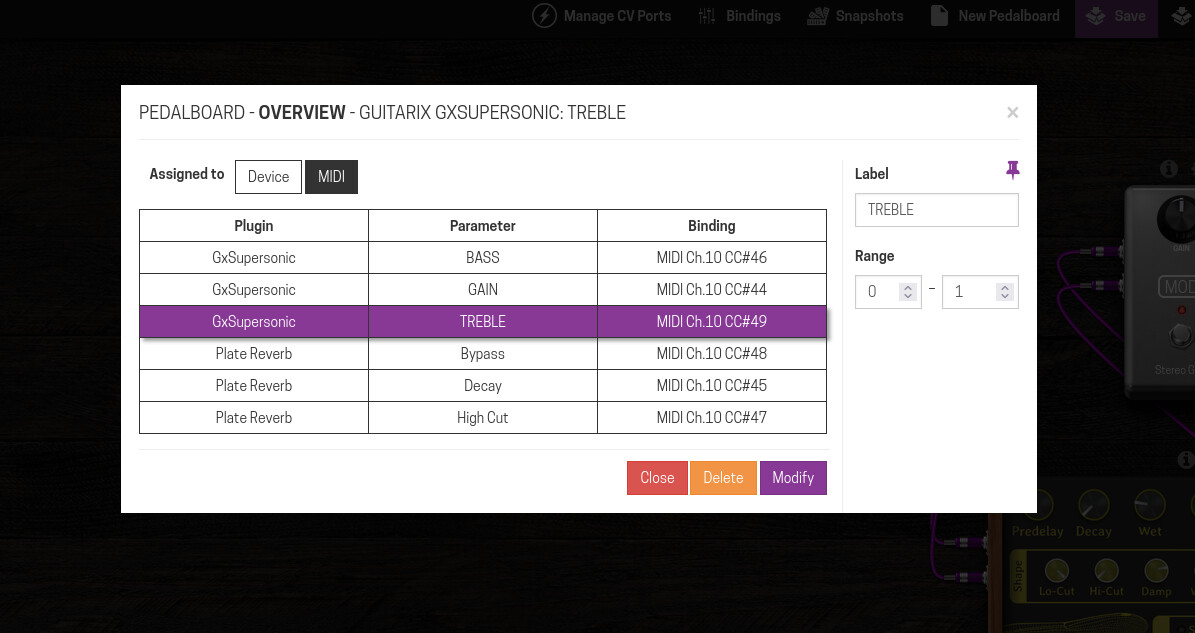
quick update, Midi binding overview is progressing nicely, still some work to do, but I hope to release soon.
14 Likes
Hey @AndreaDelSignore finnaly I checked some more of your OS version! Great work first of all.
I didn’t have time before to test properly the A / B features and none to test the Bindings. Also, the Performance Mode, now I feel that I did a “decent” test with it.
Everything seems to work great and is so painfully simple that my brain kept trying to search for the complicated side of it and “trying not to understand it”.
Bindings is a great example of it. I kept trying to find the complex thing on it, but in fact it is nothing more than an overview of all the device assignments that also allows you to edit them from a single point (without doing it plugin by plugin). Great!
The A / B comparison I must admit that I had a bit more difficulty understanding how to use it.
The need to take “the picture” that gets stored in both of the A and B slots and then you select one…got me a bit lost. Question here: would not be possible by default that slot A has the settings from the loaded pedalboard (once you load the pedalboard) and you interact with the B? So if you want to go back to the original you click on A…but this would also be “editable”, basically if you have it activated and change something that gets stored. Just like it happens after the first usage.
I guess that could even remove the need for the camera button.
Overall, that made me think about something that I’ve already thought about before.
I feel that is more a request to the development team from MOD (therefore I tag @falkTX also here).
While testing some features that you implemented, I felt again a problem that I had before and it can be really problematic for new users, or even for old users who update their devices and see something new that they don’t understand because they don’t follow the forum so closely.
Especially on the Pedalboard Action Bar, the Status Bar and the Mode Selector, I feel that we should have some info either with a text box popping up while we hover on top of the icons or with some side screen (similar to the advanced view for assignments) that could be pinned somewhere or closed and would show some info in case we need. It could be by clicking on the icon or something similar to how Ableton does with Live.
Of course, when the features are official, we try as much as possible to explain them in the Wiki (updating that to be according the 1.13 in all devices is actually what I’ve been focusing on the most on the last couple of weeks). Yet, when you are creating a pedalboard, you don’t have much time to go search for something that you are not even sure that you need / can use in the wiki and I think a small explanation of those things would be great (and likely I would not have gotten so lost on the A / B comparison). As the “MOD Gandalf for documentation”, I would be super up to get the text for each feature (upon likely some back and forward to check if I got it completely correct and if I don’t forget anything.
@AndreaDelSignore, @falkTX and the others, what do you think about that?
4 Likes
I agree with you — an inline help system would be great!
Even though it’s not too hard to implement, it would be quite time-consuming to maintain.
It could also cause some information to get scattered between the wiki, the MOD tooltips, and so on.
Anyway, it’s definitely something I should consider for the stable release.
In the meantime, I’ve tried to document all my modifications here:
4 Likes
Yes. I’m aware. I think that’s the reason why it never went through. We were always a small team and that would require quite some time from development and from the documentation people.
My idea here is that you keep it to a minimum possible and for more info you use the clichê “for more on bla bla check this link” that would led you to the wiki respective page.
3 Likes
Hey @AndreaDelSignore, I have a question for you:
The great feature of allowing to download of the pedalboards was something that you added or was some heritage from the stuff already in the official image, but not released?
I’m asking, because I miss a (somehow obvious) feature to allow the upload of pedalboards 
1 Like
I only added it to make debugging easier at the beginning.
BTW, I’ll try to push out a new version this weekend — I didn’t have much development time in this cycle.
Yes, there isn’t was just a debugging feature, perhaps I should hide for now…
5 Likes
Gotcha!
Personally, I like it.
This helps you back up stuff and keep it somewhat organized.
I give a practical example: let’s say you are recording a new track and you have created a pedalboard for that. You can easily store the pedalboard file in the same folder that you store all audio recordings, DAW sessions, etc., so you can easily track everything. And if you have a problem in your MOD Dwarf and you may lose some data, you play on the safe side and you don’t lose the most important one.
My suggestion: survey the community 
That sounds cool I’m excited about it.
1 Like
New release - aLabs version 8 beta
New small release! Even though I didn’t have much time for this cycle, Starless has still made good progress.
For this round I managed to complete the MIDI tab in the binding overview and fix a critical bug in the performance view. I also submitted the final pull request to the standard firmware to add support for port groups.
Once it’s accepted, we can start improving the plugin definition files to include port group data and get a cleaner, more consistent interface overall.
Thanks to the community for the support and to @jon for the input and all the advice!
Download: Release aLabs version 8 (beta) · sejerpz/alabs-mod-custom-images · GitHub
19 Likes
MIDI in bindings is great!
- no more guesswork, thanks!

5 Likes
Performance view on the laptop & Plugin Edit on the Dwarf is so good, I just found out how good…
3 Likes
Great news @AndreaDelSignore
And thank you for everything that you are providing to the community! This is really awesome!
I’m here for that and I’m happy on doing it. I will try to keep it flowing as much as possible and give you all the tools that you need to keep what you are doing.
I actually may have found a bug on the plug-in editor just the other day. But I want to try on this new version before reporting it.
I can tell you that on the weekend I was with a guitarist friend that is considering to get a MOD Dwarf to a synth setup that now he requires on a fairly big project he plays and the plugin editor was one of the features that most excited him. And thats 100% yours
8 Likes
So I’m back to report the bug…in the meantime, I found another that is more visual than anything else: on the Cabinet Loader plugin editor, it seems to be a glitch that creates a funny spot under the plugin title, it also makes somtimes either the header for “Presets” or the preset name itself a bit “funky”
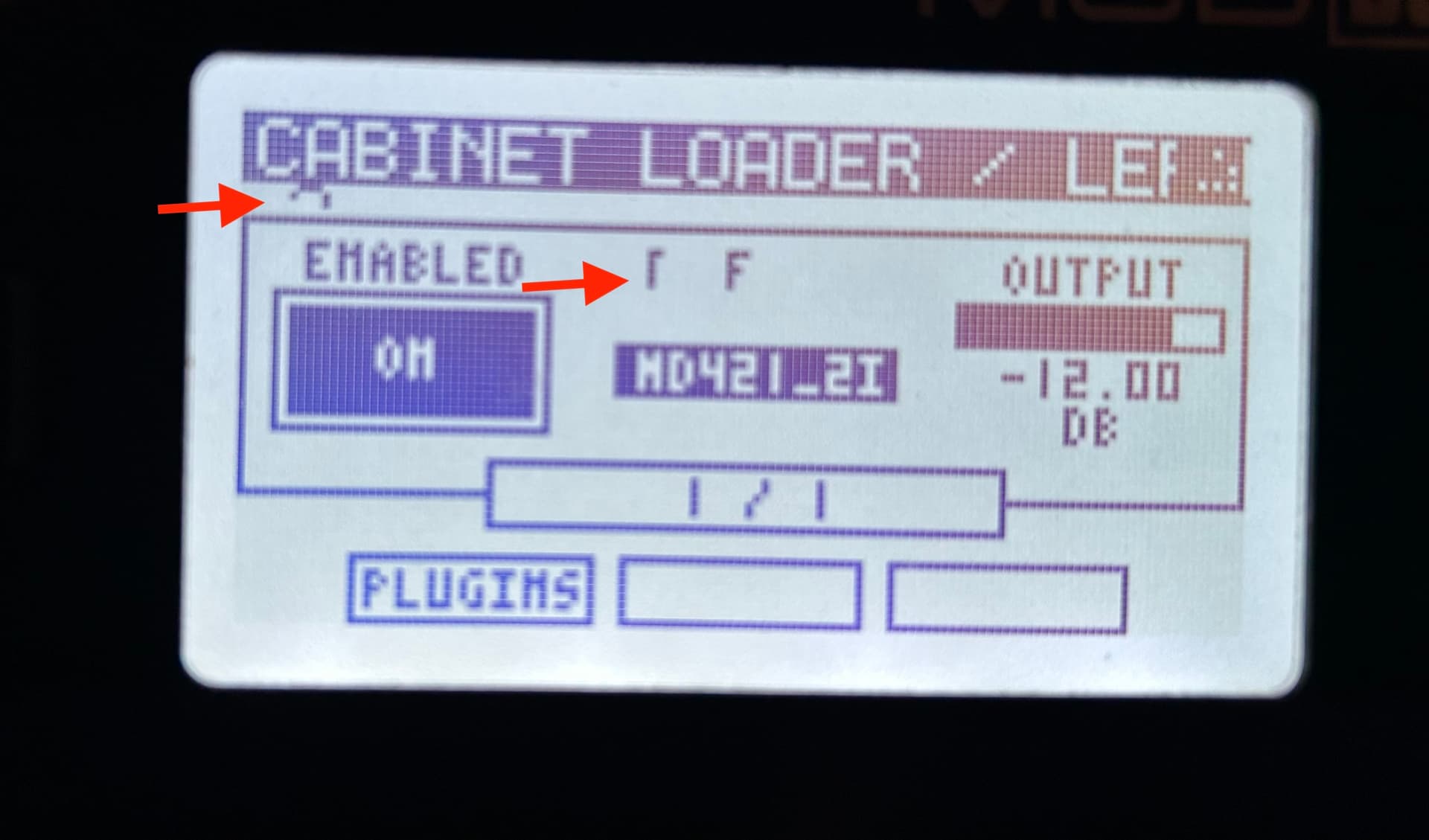
It seems to be in general with the presets, because I just had it happen with the Dragonfly Plate Reverb. Switching pages fixed it.
Now the bug I wanted to report: When changing presets on AIDA-X it freezes the full UI. Audio still goes through, but you can’t interact with the device anymore. You can also still access the WebGUI while the device interface is frozen.
It actually seems to have something more on the behaviour. First, I access the Plugin Editor for AIDA-X and try to change the preset and on the screen, I get another control being changed (always from the LP1 that I also have on this pedalboard). Then I go back to the plugins list and go back to the AIDA-X and it freezes.
Check the video. (Actually, while recording the video, I managed to go a step further than I ever got before, but I believe it was only because I was fast).
EDIT: I guess it interacts with that parameter of the LP1 because it’s what I have assigned for that very same encoder on the first page and first subpage.
2 Likes
Thank for the report.
The UI glitch was already reported by Abotte IIRC, but I didn’t manage to find the root cause and fix. Anyway it’s just a cosmetic bug.
The freeze is instead a major bug, I’ll take a look ASAP and report back when I found a fix or if I need some more testing.
3 Likes
Ah sorry, forgot about that. Yes, it’s a bug that “doesn’t bug me” 
Cool. Let me know if you need some extra info from my side.
And thanks a lot!
1 Like
Hi Andrea,
I have a small bug to report, nothing to worry about since it’s quite a remote use case: I noticed that the binding assignment is not working if you have the onboard plug-in editor open. It seems to really assign the control to a footswitch (the icon of the assigned parameter turns purple), but on the device, the binding is not acquired. I didn’t try, but I guess that assigning an encoder would be the same.
I’m reporting this because I assume you’d find any feedback valuable, but I’m not sure it’s worth fixing. This bug requires using the on-board plugin parameter editor and the web GUI simultaneously, which is quite a nonsense imho 
1 Like
Hi, yes I find any feedback valuable.
Yes, but we can do better, there are some places in the firmware that display a message when attached to the web gui, may be I should do the same and don’t allow on device editing while connected with the GUI.
Ehm, please don’t
I find it very handy to use both the web GUI and the on board editor at the same time, and I remember a post of another user who tweaked the software to bypass that nag screen.
If you think you really need to solve the issue, maybe you should prevent the web GUI from saving a binding if the onboard editor it’s opened.
2 Likes
Don’t get me wrong… But you can’t take that hiatus. lol… Looking forward to more updates. This project is sensational! Congratulations!
Hello,
as expected development slowed down during december and january, too busy at work, but I’m near a new release.
I hope to finish the last things in the next weeks 
@jon I didn’t manage to reproduce your bug would mind to send me the pedalboard?
11 Likes