mmm, I can’t replicate that. Just for the bypass button, which I have a fix for.
Can you tell me exactly what you are doing, what plugin, what parameter, when controller CC and I will try to replicate it?
mmm, I can’t replicate that. Just for the bypass button, which I have a fix for.
Can you tell me exactly what you are doing, what plugin, what parameter, when controller CC and I will try to replicate it?
I’m using a mindi plugin to send a message to change my controller setting…
Oh, an this controller send back a message to switch off some plugins, you’re right, sorry !
So it is just bypass?
Yes, it seems that this only happens with the on/off bypass.
Super, I have a fix. Just needs a bit of a tidy up and testing and I will send it to Andrea.
Ok, sent to Andrea. Lets hope I haven’t messed up again 
Sorry for the hassle guys.
I have had a look into this a bit and mod-host works fine with multiple controllers onto a single parameter.
The front end stuff though is all written to only support a single controller, I have had a look at changing the mod-ui stuff and to be honest I have no idea how any of it works as I know very little about web based stuff. I will keep looking in any spare time though to learn some more!
Cool, thanks ! That would be amazing (and I would remove a dozen mindi plugins on my pedalboard)
This evening I have a concert at a small venue, stay tuned for tomorrow night
I’ve just released version 14
Crash with bidirectional midi should be fixed. Thanks @AndyCap
Here’s the link:
I have checked all the midi stuff, seems good now
The control chain stuff is not working though, from mod-host:
PROTOCOL: received 'cc_unmap' '3' ':bypass'
PROTOCOL: response 'resp -401'
PROTOCOL: received 'cc_map' '3' ':bypass' '1' '0' '2VOICES' '0.000000' '0.000000' '1.000000' '33' '33' 'NONE' '0'
PROTOCOL: response 'resp -401'
I went back and tried the official release, ok there. Also ok in your V11, stops working from V12 on.
So I immediately thought I had messed something up with the midi stuff so have investigated a bit.
It seems the control chain stuff has not been compiled due to the HAVE_CONTROLCHAIN define:
int effects_cc_unmap(int effect_id, const char *control_symbol)
{
#ifdef HAVE_CONTROLCHAIN
    if (!InstanceExist(effect_id))
        return ERR_INSTANCE_NON_EXISTS;
    if (!g_cc_client)
        return ERR_CONTROL_CHAIN_UNAVAILABLE;

    for (int i = 0; i < CC_MAX_DEVICES; i++)
    {
        for (int j = 0; j < CC_MAX_ASSIGNMENTS; j++)
        {
            assignment_t *assignment = &g_assignments_list[i][j];

            if (assignment->effect_id == ASSIGNMENT_NULL)
                break;

            if (assignment->effect_id == effect_id && assignment->port != NULL &&
                strcmp(assignment->port->symbol, control_symbol) == 0)
            {
                cc_assignment_key_t key = {0};
                key.id = assignment->assignment_id;
                key.device_id = assignment->device_id;
                key.pair_id = assignment->assignment_pair_id;

                mod_memset(assignment, 0, sizeof(assignment_t));
                assignment->effect_id = ASSIGNMENT_UNUSED;
                assignment->assignment_pair_id = -1;

                if (key.pair_id != -1)
                {
                    assignment = &g_assignments_list[i][key.pair_id];
                    mod_memset(assignment, 0, sizeof(assignment_t));
                    assignment->effect_id = ASSIGNMENT_UNUSED;
                    assignment->assignment_pair_id = -1;
                }

                if (g_verbose_debug) {
                    puts("DEBUG: cc_unmap sending:");
                    printf("\tdevice_id: %i\n", key.device_id);
                    printf("\tid:        %i\n", key.id);
                    printf("\tpair_id:   %i\n", key.pair_id);
                    fflush(stdout);
                }

                cc_client_unassignment(g_cc_client, &key);
                return SUCCESS;
            }
        }
    }

    if (g_verbose_debug) {
        puts("DEBUG: cc_unmap failed");
        fflush(stdout);
    }

    return ERR_ASSIGNMENT_INVALID_OP;
#else
    return ERR_CONTROL_CHAIN_UNAVAILABLE;

    UNUSED_PARAM(effect_id);
    UNUSED_PARAM(control_symbol);
#endif
}
That ERR_CONTROL_CHAIN_UNAVAILABLE is the -401 I am seeing.
We have this in the makefile:
# control chain support
ifeq ($(shell pkg-config --atleast-version=0.7.0 cc_client && echo true), true)
LIBS += $(shell pkg-config --libs cc_client)
INCS += $(shell pkg-config --cflags cc_client) -DHAVE_CONTROLCHAIN
endif
Something iffy there I guess, looking into it more…
Hi Andrea,
I have the details of how to get the control chain stuff into mod-host here: control chain code not being compiled in mod-host · Issue #50 · sejerpz/alabs-mod-custom-images · GitHub
Cheers
Andy
I’ve just released version 15.
Release page: Starless aLab 15 Release
Many thanks to @AndyCap for the detailed information that helped track this down.
Nice one, I’ll install it later and give it a test
I installed Starless and I love it! It solves so many issues I had with the official image! But I noticed something strange which is that dragging new plugins in the moddwarf.local web GUI doesn’t show them being dragged and they just appear after a while at where the mouse dropped them off. Does anyone else have that issue or is it maybe not related to Starless and I just noticed it now?
aLabs 15 runs flawlessly here ! Thanks @AndreaDelSignore and @AndyCap !
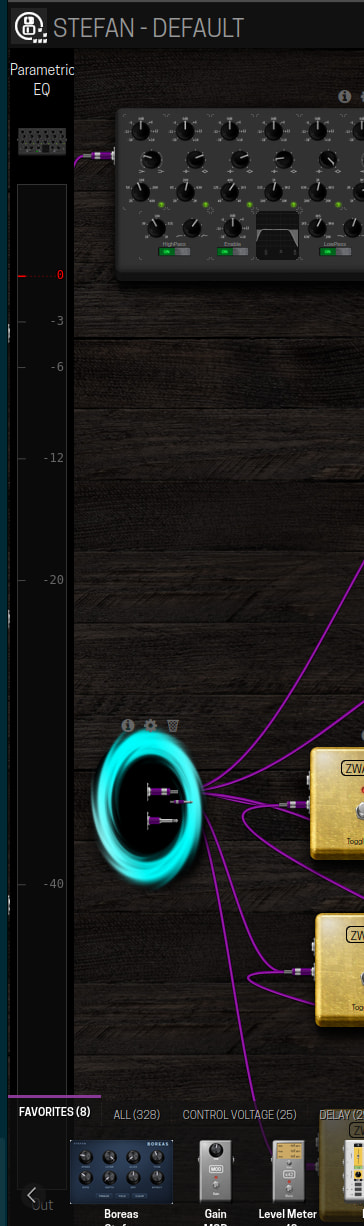
@AndreaDelSignore I tried the per-effect output level monitor on my Dwarf pedalboard. When I clicked to remove the monitor from an output it reappeared by itself, in the end I had to switch to a different pedalboard and back again to get rid of the monitors, but the global monitor is still stuck on the left and I don’t know how to remove it completely. Could you help me out on how to disable the global monitor since it also hides my inputs on the left?
Edit: it went away after a reboot, so there is some solution to get rid of it
I have had this a few times, a browser refresh seems to work for me. Did you try that?
I get this as well, I think it is maybe something to do with being able to drag a new plugin to replace another plugin (the sort of curved arrows on plugins that can be replaced)?
There’s a bug but it’s intermittent. When you’re stuck with just the global monitor without any other output monitor just refresh the browser to get rid of it (shift + f5)