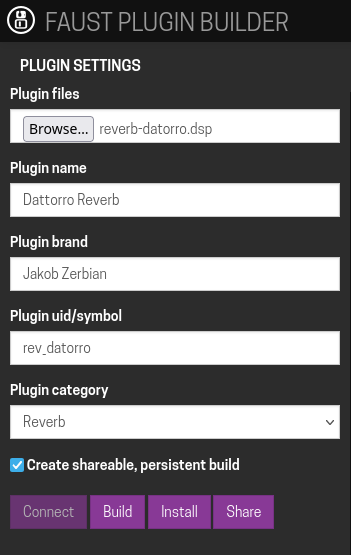
As of today the little service we have online at http://builder.mod.audio/ for developers to quickly build their own plugins has a switch for shareable, persistent builds.
For those that don’t know, this is an online service that talks to your MOD device over the local network and allows to build a plugin based on puredata, MAX gen~ or faust in a super easy way - just upload your files, set some meta-data and press “Build”.
With this update we added a new checkbox under the plugin settings appropriately named “Create shareable, persistent build”.
When this checkbox is enabled the builder service will do builds for Duo, Duo X and Dwarf units and store them on the server, once the build is complete a new “Share” button becomes visible, clicking that opens a new browser tab with a dedicated page to install this custom build. You can share this link with other people.
And the resulting shareable link for this build is http://builder.mod.audio/install/v2jy1vu1
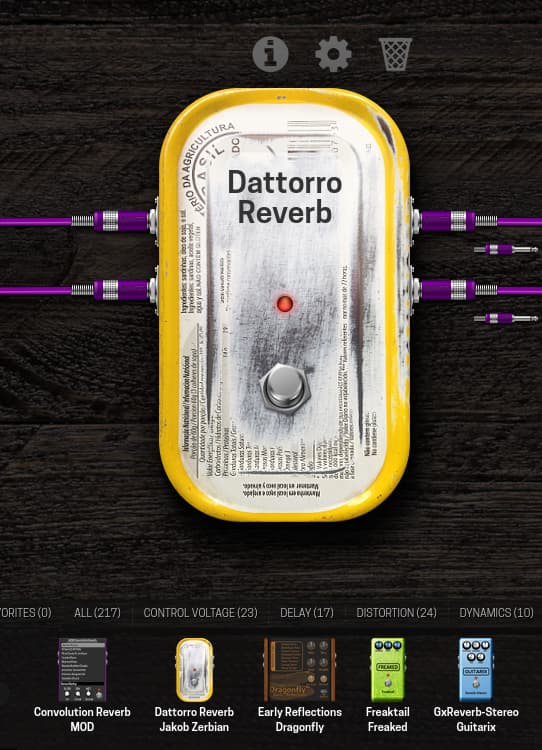
If your MOD unit is connected over USB, you can simply open that page and click the “Install” button on the top-left corner. The build that matches your device (Duo, Duo X or Dwarf) will be automatically installed and become visible on the plugin bar just like any other plugin.
This is insanely cool! Do you have an example of a gen~ patch I can use to get started with this? Like, do inlets and outlets have to be in a specific order or anything?
With the increased use of direct C/C++ creation - either via the cookbook or straight AI assistance - I have promoted the Buildroot section - which was previously hidden under the /buildroot subfolder - and now it is featured right at the home of the Cloud Builder.
Additionally, updates and improvements have been made in the last weeks. Here’s the actual changelog:
2026-10-03 - Pure Data: hvcc 0.17.2, [expr] and [expr~] now work
The Pure Data route now compiles with hvcc 0.17.2 (it was 0.14.0 from September 2025). The main gain is [expr] and [expr~], which hvcc added in 0.15.0: patches using them failed on the builder with “Don’t know how to parse object expr”. Also new since 0.14: [list], [route float], [threshold~], multi-line expressions, a number of cyclone objects, and various bug fixes (see the hvcc changelog).
What expr doesn’t do (hvcc limitation, not ours): mtof, ftom, dbtorms, rmstodb, powtodb, dbtopow, size, sum, avg, random; table and symbol access; in [expr~] only signal inlets ($v1, $v2, …, no $f2) and no drem (use remainder); no [fexpr~].
[expr~] is compiled without SIMD, which hvcc requires. The builder does this automatically when a patch contains [expr~]; other patches are unaffected. On the Duo this costs some CPU for that patch; on the Dwarf and Duo X it makes no difference.
The builder carries a small fix for an hvcc 0.17.2 bug where [expr~] with a numeric constant (expr~ $v1*2) did not compile unless the patch also contained an object like [sig~].
Existing patches build exactly as before: tested with Wasted Audio’s FLANGR, 3Q and DL3Y sources on a Dwarf and a Duo, the output is identical to the previous hvcc, sample for sample, at the same CPU cost.
Reminder on abstractions: upload every abstraction your patch uses (including the ones your abstractions use) as separate files, and reference them without a folder prefix.
2026-10-03 — Home page
The Buildroot package route (/buildroot: upload a buildroot .mk and build any plugin source) now has its own tile next to FAUST, MAX gen~ and Pure Data. The tiles wrap on narrower windows.
2026-09-28 — Share page
Shared builds made through the Buildroot route showed an empty name, author and category on their share page. The page now reads them from the built plugin; existing share links are fixed too.
2026-09-24 — “The builder doesn’t connect to my unit”: http and https
The cause: recent Chromium browsers (Chrome, Edge, Brave, from Chrome 142/147) block a plain http:// web page from talking to devices on your local network, which is exactly what the builder does when it connects to the MOD at 192.168.51.1 over USB. Nothing changed on the units; the browser silently refuses the connection.
The fix: the builder is now also served over https://. Chromium browsers are sent to the https site automatically and get a one-time “allow local network access” prompt.Just click Allow and the builder connects as before.
Firefox and Safari have the opposite problem: they do not allow an https page to open a plain connection to the unit. They are sent to the http site automatically, and work there as they always did. Same address either way: just open builder.mod.audio.
Safari on macOS 15: if it still can’t connect, check System Settings → Privacy & Security → Local Network and make sure Safari is allowed.
As before, the builder continues to require MOD OS 1.13.3 or later on the unit.