Yes, it is a “universal” build so natively compatible with both intel and arm.
Yes, use the LV2 option to show all plugins, disabled by default.
There is no installation of new plugins via mod-app for the moment
Yes, it is a “universal” build so natively compatible with both intel and arm.
Yes, use the LV2 option to show all plugins, disabled by default.
There is no installation of new plugins via mod-app for the moment
I started the services with the logging panel open and I saw that /Library/Audio/Plug-Ins/LV2 is scanned and the plugins in there are loaded. Also, if there’s a newer version of a shipped plugin in /Library/Audio/Plug-Ins/LV2, it will load that one over the one in the application bundle.
Nice!
Here’s my experience with 0.0.5 on Windows.
a) I saw a message (must be installed as administrator), but I did not stop and re-run installation as admin, I just “allowed” it when it asked.
b) Windows defender and Avast anti-virus were interested in this but Avast decided it was OK (not surprising, just telling you what happened).
c) Multiple Mod App windows popped up (I think I had 3 at one point).
d) Two Mod App entries in systray were seen (I closed one of them).
e) I am not able to actually start audio. I click on the start button and a few seconds later it (the button) becomes active again (meanwhile, nothing happened - except the error report).
My audio interface is a Behringer XR18. I also have ASIO4ALL installed, which I did recently. I’m not 100% sure I need it.
This is the error with either XR18 ASIO or ASIO4ALL. Doesn’t like the sample rate. It’s set to run at 44100 at the moment. Will try changing it to 48000.
=================
Starting jackd using:
-R -S -n mod-app -X winmme -C .\jack\jack-session.conf -d portaudio -r 48000 -p 128 -P ASIO::ASIO4ALL v2
jackdmp 1.9.22
Copyright 2001-2005 Paul Davis and others.
Copyright 2004-2016 Grame.
Copyright 2016-2023 Filipe Coelho.
jackdmp comes with ABSOLUTELY NO WARRANTY
This is free software, and you are welcome to redistribute it
under certain conditions; see the file COPYING for details
Drivers/internals found in : C:\Program Files\MOD App
Drivers/internals found in : C:\Program Files\MOD App
JACK server starting in realtime mode with priority 10
self-connect-mode is “Don’t restrict self connect requests”
Can’t open default PortAudio device
Cannot initialize driver
JackServer::Open failed with -1
Failed to open server
==========
Using any of the WSAPI devices gives this error.
Pa_OpenStream error = Invalid sample rate
Can’t open default PortAudio device
Cannot initialize driver
JackServer::Open failed with -1
Failed to open server
===
DL
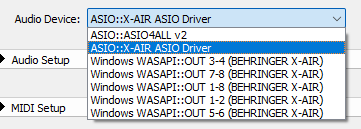
UPDATE - took me awhile to figure out how to change the Behringer’s sample rate. Much happier at 48 kHz. Checking it out now.
First impression - can’t read the knob text on the pedals very easily. The few things I tried seemed to work OK.
Just quick test of 0.5. With “show all LV2 plugins” Neural Amp Modeler missing GUI. I just like to use noise repellent, that’s why I checked this checkbox.
Any chance of adding a version for Arm64/AArch64?
Sam x
the required setup for it is not very worthwhile I think. (very little amount of users vs the amount of work needed for it)
the cross-compilation of python is particularly painful.
in theory everything already works as-is for building on a arm64 linux pc, it is the cross-compilation (needed for CI/automated builds) that makes things more complicated.
actually one nice thing for having the community here do is a flatpak variant, which has a bonus of being directly installable from a few linux app stores.
this is something that I have no experience with whatsoever, and where community involvement can really make things happen.
eventually mod-app would go into https://flathub.org/ when it is all ready
 awesome !!!
An AppImage would also be great, even easier for users than a Flatpak.
is there a need for an AppImage if there is already a regular Linux binary release?
though if you want to do it, by all means go for it.
Just wanted to share I’ve the MOD App v0.0.5 up and running on my Mac.
MacBook Pro
13-inch, M1, 2020
Apple M1
16GB Ram
Sonoma 14.1.1
It recognises my Scarlet 2i2 gen4. Only fiddle is having to authorise access to the speaker, but I see from above this is already known.
Edit: The Scarlet is going back to Amazon, but the MOTU M4 is staying, it also works with MOD Desktop but has midi … and twice the I/O!
Thanks!
Sam x
Sorry, I must have missed it. As the readme in your Github says “MOD App only has builds for Windows 64bit for now”, I thought the linux tar.xz contained sources and not a binary.
Running v0.0.5 on Mac M2, with a Behringer UMC404HD. Works great, the only noise is from my pickups now 
that was the case before yeah, but now macos and linux work as well.
need to update that readme…
MOD App v0.0.5 works on my Manjaro Linux, with a MOTU M4.
But I don’t know how to load a IR file because there is no /data/user-files dir.
When I push the “Open User Files,” only a thunar file browser is opened but can’t upload.
you dont need to “upload” here, files are local because the application is also local.
so place IR files under there, you should have the folder structure already created for you, it is just a matter of copying/moving/linking files in the correct folder
Thank you for your reply.
I’m sorry that I didn’t notice there is the MOD App folder created under ~/Documents.
the “open user files” button supposedly opens the ~/Documents/MOD App/User Files for you, is this not the case in your system?
Yes, the button opens the folder.
I just didn’t notice that because I don’t use the file browser often.
Thank you.
Another release!
Project has been renamed “MOD Desktop App”, old settings will not automatically migrate.
If you were using it before you can simply rename your “MOD App” documents folder to “MOD Desktop App”, then install the update and everything continues as before.
You might have both “MOD App” and “MOD Desktop App” installed at the same time, just remove the first.
Also this is the first release to require the agreement to a few terms of service, we didn’t have in place yet and are required to do so (the application is meant to connect to the cloud stuff eventually after all, which needs these bits).
There are some minor analytics in place too now, but running under our own control. (for those that care, it is using matomo instead of the common google stuff)
As we provide the application for free, we feel like it is a very reasonable trade off. The data we receive should help us understand which plugins and features are actually used. Also helps to know how popular (or not) the application is over time.
Enjoy!