How to deploy a LV2 plugin to the Duo X?

I’m not quite sure where to begin.

I’m in DSP development for about three years now. First with Pure Data, and later with plugin development using C++ on Linux. I’ve developed a fairly extensive library that allows me to easily create effects. A few things are still a bit clunky, but I’ve managed to establish a pretty good and stable architecture. I’ve even built a complete synthesizer. But I won’t be doing that again; it’s far too complex. It cost me a whole year’s worth of sleepless nights. It was a good project, though, because I learned a lot directly.

Besides satisfying my curiosity, my main interest lies in creating effects that I can actually use myself. So far, I’ve been using Pure Data as my plugin host. It’s quite simple, and with the C&G Organelle, it’s also OTB (outside the box) for live events.

However, I’ve found Pure Data too limiting as a platform, as it’s difficult to integrate properly anywhere. I then decided to also support LV2, which was a good decision. I’ve already created a well-functioning environment there, allowing me to quickly develop plugins. Now I can use my plugins in any Linux based DAW that supports LV2.
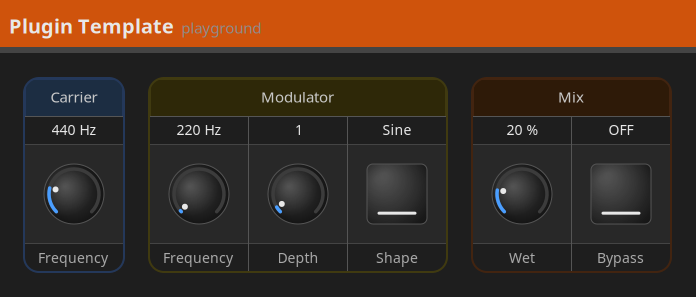
It’s just a X11/Cairo based grid environment where I’m able to organize controls in control groups and control groups in the plugin window. Simple, efficient and fully customizable. And reasonably presentable.

And now I’m finally getting to the point: I have a really powerful piece of hardware, namely the Duo X. Along with the C&G Organelle, it’s always with me. And the Duo supports LV2.

I’ve looked at the documentation about Mod Duo development that’s pinned at the top of this area. Unfortunately, many of the links are broken now, and I’m still not entirely clear on what’s left. And supporting the Mod UI platform isn’t really my goal yet. I’m the only user of my plugins, after all. Of course, I will eventually consider releasing the plugins, once I have reached a certain quality standard.

What I want to do, however, is use the Duo X as my OTB platform instead of the Organelle. My first question is whether the Mod platform, with its web editor, also supports LV2 plugins that don’t yet have a Mod UI implemented. LV2 generally supports a basic GUI for plugins that don’t have their own. Does this also work on the Mod platform?

And if so, my next question is how to deploy the plugin to the Duo X. It would be great if someone could point me to some resources on this.

3 Likes

Plugins without a UI will appear with a generic “tin can” on the pedalboard.
All their parameters will be accessible in the settings of course and can be mapped to controls there.

ps; you can also compile PD vanilla patches to LV2 using the cloud builder: http://builder.mod.audio/
This comes with some limitations though. Like not all objects are supported and some behavior is more specific.

2 Likes

Sounds good. Then the only question left for me is how to get my plugin onto the Duo X. There was some documentation somewhere, but unfortunately I can’t find it anymore.

I think the easiest is to copy the entire LV2 bundle over using SCP (Secure CoPy).
As described here: Freezer - freeze your tone forever - #9 by zwabo

Of course you’ll need to make sure that your plugin binary is properly cross-compiled for the DuoX, which is easy enough using GitHub - mod-audio/mod-plugin-builder: MOD Plugin Builder · GitHub

2 Likes

Thanks, @dreamer, for the help here.

@Thomas, indeed, lots of links and documentation are outdated. Actually, the Online Builder (and thanks again @dreamer for mentioning it) is not documented anywhere more than a post of @falkTX here in the Forum.
I’ve been doing a fairly big update / clean up on the MOD Wiki and that should also go there. I still didn’t dive too deep on the plugin development parts of the wiki and I’m still working on the main page, WebGUI user guide and MOD Dwarf user guide (which were all missing quite a lot of stuff released with the last MOD OS updates).
That said, tips on how to organize things, “heads-up” on broken links and outdated stuff are more than welcome :slight_smile: - although we should likely create a thread for that.

3 Likes

Thank you both! This brings me a little further.

My plan was actually to create ARM binaries and then deploy them to the Duo X. For this purpose, I have set up a small environment that at least supports Windows and Linux with currently LV2 and PD plugin interfaces and also x64 and ARM (later perhaps also VST3), which is also the platform of the C&G Organelle. It’s all already there. The MOD Plugin Builder doesn’t really fit in there. But if that’s the way to get plugins on the device, then so be it.

But I would prefer if I could do it without the builder at first. So build it in my environment and then somehow get it over there and register it so that it is available in the Mod Web UI.

Isn’t there perhaps another way other than the builder’s? On the other hand, I’ll probably find that in the builder too. Maybe I should look there.

It’s mainly that mod-plugin-builder will apply device specific optimizations which are useful. A generic ARM64 target won’t run as well as an optimized one.

At minimum you’ll need to use a compatible libc version otherwise the plugin won’t load.

2 Likes

Then I’ll do it that way.

However, I’m a little worried that the builder might reconfigure my PC.

To begin simply run:

./bootstrap.sh <platform>

Where platform is either modduo, modduox, moddwarf or x86_64.

The script will build the toolchain (ct-ng) and buildroot.
Depending on your machine it can take more than 1 hour.

If it really takes up to an hour, it’s probably not just a few files being copied. Would a Docker container be a good option?

Use the docker container then.

Thanks again for your information.

First, I followed this documentation:

https://wiki.mod.audio/wiki/How_build_Plugins_using_Docker

Unfortunately, without success. The environment is no longer building. You might want to take a look at it sometime. Of course, I can’t rule out that I made a mistake myself.

In the end, I built my own environment, which better suits my inclination towards automation.

Anyone interested can take a look here:

There’s a step-by-step guide that I’ve now tested several times. So it should work.

However, one question remains:

Can the different environments coexist on the same machine, or is a separate machine required for each environment (moddwarf, modduo, modduox)? I haven’t quite grasped the rationale behind these different environments. Does my plugin only run on the Duo X?

2 Likes

I would use local builds only for testing on your own device. To build your plugin for other users on all platforms I would recommend MOD’s cloud builder: MOD Cloud Builder. And to release the plugin on the store you can open a PR at GitHub - mod-audio/mod-plugin-builder: MOD Plugin Builder · GitHub. The PR should just contains the makefile. It can take some time before it’s reviewed though.

2 Likes

Yes, that’s exactly what it’s designed for. And so far, I’m quite happy with my solution because it eliminates the hassle.

Thanks a lot for the tip about Cloud Builder. If I ever release a pedal, I’ll definitely use it.

I’ve been working on a granular effect for quite some time now. Perhaps this would be a suitable candidate. We’ll see…

1 Like

Hello @Thomas,
quite cool to follow your process and really nice that you shared your achievements.
I have a question: would it be fine if I use your findings to document for other users who may have similar needs? I’m still not sure if/when I would do it, but as I’m working quite hard on a wiki update, I would clearly consider it once I reach the plugin development parts.

PS:

granular effects are always welcome on my side :slight_smile:

Yes, that’s absolutely no problem.

Creating those beautifully pearly grains is quite a challenge. If it ever works the way I envision it, I’d be happy to present the plugin.

1 Like

Indeed! I have some experience with that for a long, long time with Max MSP. I think it was actually an assignment from a class in my BA. If I remember well, I did not get such a nice grade on it :sweat_smile: although positive still…but I barely understood the granular idea at the time.

1 Like

Hi All - I am trying to deploy my first plugin to the Dwarf using the mod-plugin-builder. My plugin is sort of working - I can drag it to the canvas and delete it, but no controls are showing so I am trying to debug. However, whenever I try to update it, I end up in a browser reload loop. What is the proper way to “install” a new version of my plugin? I am just executing the command as per the readme:

./build PLATFORM PLUGIN-PACKAGE-publish

But I am getting an empty response from the server. If I try the manual way from the WIKI:

$ cd ~/mod-plugin-builder/plugins/package/eg-amp-lv2/source/
$ tar cz eg-amp.lv2 | base64 | curl -F ‘package=@-’ http://192.168.51.1/sdk/install

It tells me “Bundle already installed” or something.

What am I missing?

How about using scp?
You can find instructions by searching the forum.

$ scp -rp -O eg-amp.lv2 root@192.168.51.1:/root/.lv2
2 Likes

Is it really as simple as that? I was worried there was some more advanced installation happening when hitting the API endpoint, and I didn’t see anything like that in the WIKI or README.

I think the Wiki and README of mod-plugin-builder is a bit outdated.

When you install a new version, delete first the old one and clear your browser cache to see the new one.

2 Likes