this is not just a small issue, it actually created serious problems on my system.
I’m on a Mac Studio with a MOTU interface. When I connect the MOD Duo X via USB, it creates a network interface and that seems to mess with macOS networking and my audio driver.
Result:
huge latency on the MOTU
unstable audio
GUI sometimes works, sometimes not
in one case it even caused a system crash
Bluetooth connects but I can’t access the GUI.
USB works sometimes (192.168.51.1) but breaks my whole setup.
modduox.local never resolves.
Right now the only thing that works is connecting from my iPhone, which is not usable for actual work.
Unit: MOD Duo X
Build Date: 2024 Oct 07 19:31:43
OS Version: 1.13.5.3316
last mac studio with macOS Tahoe
So I need to understand:
what is the stable way to use this on macOS today?
Yet, exactly this I was trying to ask and you didn’t clarify it.
Anyway, I think we can also move with some community help.
I don’t have a Mac with macOS Tahoe. Does anyone reading this have one and can give us some input on the issue? Do you also have problems accessing the webGUI?
Hey Jon, thanks. I already tried different USB ports directly on the Mac Studio (no hub) and also different cables.
Another important thing: I can’t even properly access it through Bluetooth dongle mode.
When I put the Duo X into listening/pairing mode with Bluetooth enabled, macOS does see the MOD Duo X in the Bluetooth devices list. But when I try to connect/select it, macOS asks for a PIN code, then the device disappears from the list shortly after.
From iPhone it works fine and I can access 192.168.50.1 without issues.
So at the moment the problem seems specifically related to macOS Tahoe networking/Bluetooth handling with the Duo X.
@avenir, no problem A weird issue indeed and I will try to help you solving it.
This is normal. The pin should be 0000. You can see it on the 4th line or so here.
I guess this has something to do with your Mac configuration. Now, my doubt is if it’s just on yours, or has something to do with the macOS Tahoe. Does anyone use this version with a MOD device successfully?
@avenir have you tried with another computer? Just to rule out the issue on the MOD Duo X side.
Thanks Jon, really appreciate the help and clarification.
I tried using the PIN 0000, but unfortunately the negotiation/pairing process still fails. After entering the code, the MOD Duo X simply disappears from the Bluetooth device list on macOS a few seconds later.
And as you already know, the USB connection is also problematic on my side because it causes severe system instability / kernel panic behavior with my setup, making the computer and audio system unusable.
So at the moment the device is basically unusable from my main workstation, except through the iPhone workaround.
could you try to get some logs from your usb port?
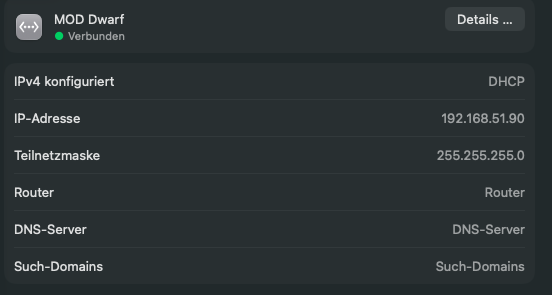
maybe you could show the network settings or use wireshark to check what is happening to your connection. based on that what we know its just a game of guessing:)
does your network look like this. where are differences?
which MOTU do you have?
Is DHCP set on OSX? I personally think a different IP Address on the MOD should fix the problem.
stay in you 192.168.51.x range but try to avoid the 1 on the end and go higher
Hi, just wanted to share what I’ve been through tonight trying to get this working.
On my Mac Studio M4 Max running macOS Tahoe, the MOD Duo X is completely invisible via USB system_profiler returns nothing, no network interface shows up, nothing. I tried different ports, no luck (I was using a USB-B cable with adapter, which might be part of the problem, but still). Via Bluetooth the Mac Studio connects to the MOD but only sees AVRCP, no Network service at all, so there’s no way to reach the GUI from the browser.
Then I tried from my old iMac on Mojave. Plugged in the same MOD via USB and it was recognized instantly. Interestingly, Bluetooth on the iMac actually shows “Network service” among the MOD’s available services, which the Mac Studio on Tahoe doesn’t. SSH worked fine, GUI loaded normally, and I was able to change the IP from 192.168.51.x to 192.168.52.x following the wiki guide.
So yeah, this is 100% a macOS Tahoe problem. Both USB networking and Bluetooth PAN seem broken or unsupported. The MOD is basically unmanageable from my main machine. Right now my only option is using the old iMac or an iPhone to access the GUI, which is far from ideal.
At this point, if this doesn’t get fixed, the MOD Duo X is just an expensive brick on my desk. Without GUI access from macOS Tahoe there’s literally nothing I can do with it no pedalboard editing, no plugin management, nothing. I really hope MOD Audio addresses this soon, because right now the device is completely unusable on any modern Mac.
Anyone found a workaround to force Tahoe to recognize the MOD’s USB network interface?
Thanks for the screenshot. The problem is that on my Mac Studio M4 Max (also running Tahoe), the MOD Duo X doesn’t even show up as a USB device at all system_profiler SPUSBDataType returns completely empty when it’s connected. So there’s no network interface to configure, the system simply doesn’t see it. I’ve tried different USB ports, same result. The cable I’m using is USB-B with an adapter, which might be part of the issue when I connect the same MOD Duo X to my old iMac via USB with a direct cable, everything works fine.
Also, nothing else is connected the MOTU is completely disconnected and powered off. It’s just the MOD Duo X plugged into the Mac Studio via USB, and it’s invisible.
So the question might be whether the Dwarf and the Duo X handle USB differently, because on your end it clearly works on Tahoe.
That’s broken on macOS since really long time (I guess from the version after Mojave or so). I found quite some reports on Apple forums, at some point they even acknowledge the issue, but never fixed it. Sorry, I forgot about that. That’s why bluetooth works on an iPhone and not on macOS.
I totally understand you, but it seems to me quite weird that no other users are reporting a similar issue. I’m pretty sure that someone here uses the latest macOS. I guess even @falkTX has a machine running it (but just guessing)
Hey jon, I appreciate the reply, but I’m not sure what else I can try at this point. I also have a Monome Norns and a Critter & Guitari Organelle, both of which I access over USB networking without any issues from the same Mac running macOS Tahoe. The problem is specifically with the MOD Duo X it’s the only USB network device that doesn’t work. So it really doesn’t seem like a general macOS issue on my end.
 A weird issue indeed and I will try to help you solving it.