Yeah! Good catch reproduced! Thanks
EDIT: and fixed, but now I know that the bindings overview doesn’t include tempo parameters at all 
Yeah! Good catch reproduced! Thanks
EDIT: and fixed, but now I know that the bindings overview doesn’t include tempo parameters at all
Hi Andy,
I’m integrating the mod-host build into starless image script, I’ve some request:
About the mod-plugin-builder: I’ve that configured from the first starless release since I always recompile and distribute the C++ bridge library for the python webserver (for me setting up was easier since I’m on linux  )
)
Well done !
Hi Andrea,
The PR is here: Changes for bidirectional midi and NRPN support by AndrewCapon · Pull Request #1 · sejerpz/mod-host · GitHub
You can build it by just setting up with mod-plugin-builder for the moddwarf and then just running make.
One thing I did notice is the SO created is bigger than the stock one, I tried with moddwarf and moddwarf-new. I’m pretty sure this is not to do with the small changes I made to the code so the build must be slightly different. I will investigate this when I get some time to try to work out the size difference…
p.s. I have built all the GDB stuff for the moddwarf as well if you would like it, so you can put gdbserver on the moddwarf and do remote debugging, or use gdb on the moddwarf itself.
@AndyCap thanks, much appreciated.
I think the size difference is due to the fact that the current master branch includes many changes (for example, falkTX added support for Pablito: DG Anagram).
My guess is that the firmware shipped with the Dwarf is based on the hotfix branch.
In any case, I need to release the latest version before moving on to the next feature.
EDiT: forgot to mention I use the moddwarf-new toolchain
Ah, that makes sense.
Gotcha!
Anyway, better keep like this until a better solution is found
Hello everyone,
Just a quick update! My plan for the next few days is to squash the minor bugs we found and then push out a bugfix-only release (alabs11)
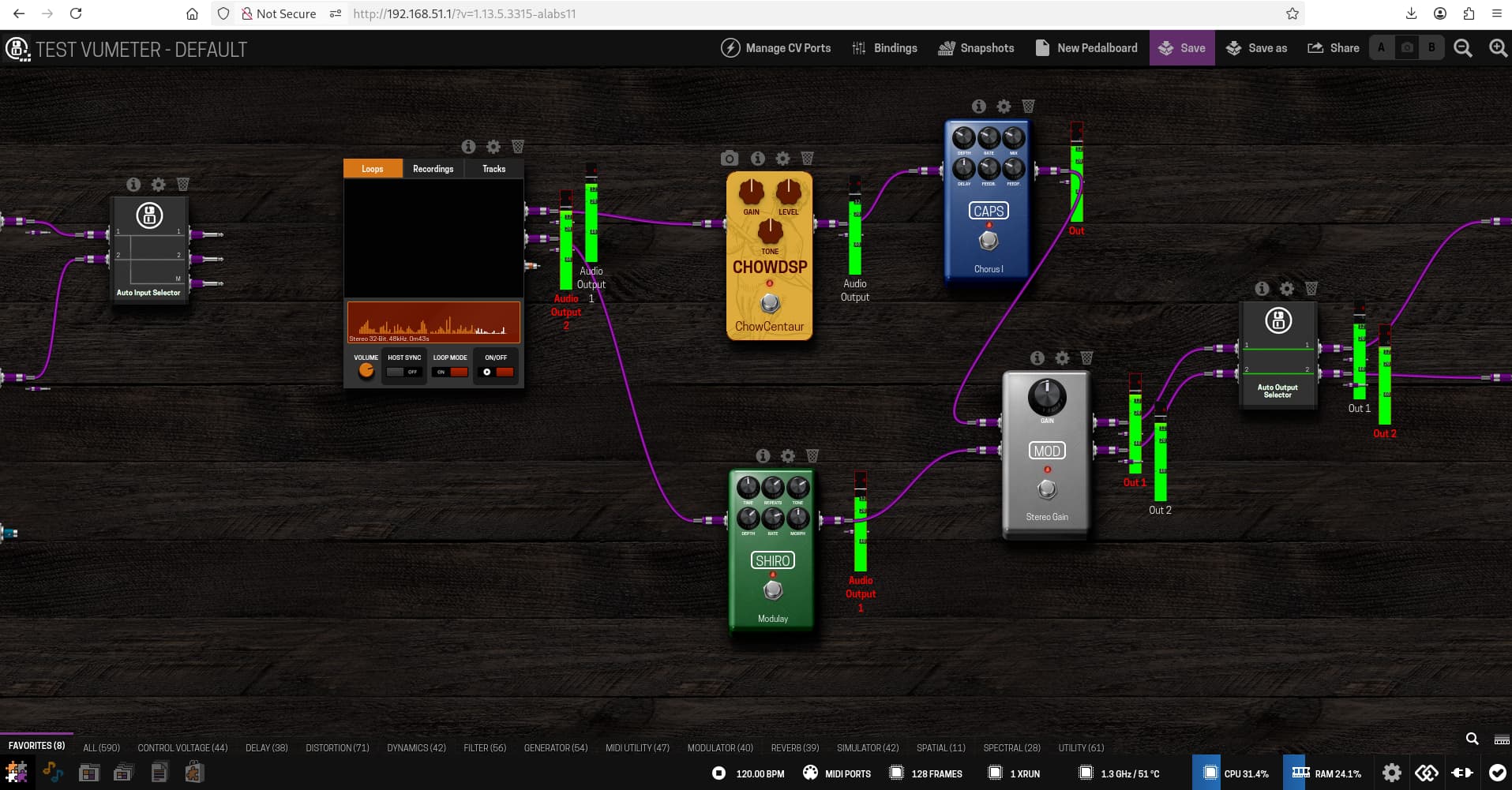
After that, I’ll be working on an alpha version (alabs12a) that includes @AndyCap’s contributions and a first POC/implementation of audio level monitoring (which is why I need to update mod-host).
Here is a look at the first UI prototype. There is still plenty of work to do, to monitor a port, just SHIFT + CLICK on a output jack.
This would be an insanely useful feature!
I have only a suggestion/feedback (if you may allow me  ): Somewhere, a button that allows activation and deactivation/hiding of the meters. I’m thinking that, although the feature is nice and super useful, sometimes it can clutter the pedalboard when you are in a stage where you don’t really need it anymore.
I have only conflicting feelings about how the show/hide should work:
1st: a button eventually on the Status Bar for meters after all plugins
2nd: on a plugin basis, so you click on some button on top of the plugin that shows/hides the meter only for that plugin.
I see pros and cons for both implementations.
A third option that I thought of now, while thinking that the stereo output plugins would add a new layer of cloughing here: a meter that appears only when you hover over the output (likely harder to implement). Perhaps with a mix of the 1st…so activate that on the status bar and when you hover over the outputs, you can see the meter…
Sorry…maybe I started ideating too much while typing  but I really see a huge plus on the feature itself!
Vey neat, I wonder how easy it would be to get a CPU use per module displayed
Hi @jon,
I have only a suggestion/feedback (if you may allow me
)
I’m posting these POCs to get early feedback so feel free to comment or brainstorm — that’s exactly the goal.
I have somewhat conflicting feelings about how the show/hide should work:
We’re aligned on what you wrote. My current thinking is that we actually need both approaches:
I ruled out hover-based interaction, as I don’t think it’s very practical to move the mouse back and forth while playing.
There’s also a more complex case to handle: when two outputs are connected to a single input, we would need to sum the dB levels from both sources. For now, I’m not planning to implement this.
Even though it’s not strictly necessary right now, I’m also considering adding a dedicated UI button for better feature discoverability, and to prepare for the future implementation of approach (1).
In summary, the next release will focus on approach (2). Here’s a quick overview:
@AndyCap that can be useful, but I don’t think that mod-host exposes that kind of information. Need to check.
Yeah, concerning the CPU usage I don’t think the Jack graph stuff can give us any help.
What would be needed is a utility plugged in before and after each node that is basically a thru but that can measure time accurately. This could all be done via mod-host in the background so would not appear on the UI.
Probably quite a bit of effort for not much gain!
Great! That’s really nice of you
Yes. When I wrote " on a plugin basis" I meant after each plugin in the chain. Not just the plugin per se, but everything on the chain up to there.
I can agree. Especially if you are physically playing something like a guitar, that implementation would be pretty useless.
Yes. And here I could even see some kind of notification or something letting you know that you actually have two “cables” connected to one input (although this is somehow a side thing). Due to the magnetic nature of the virtual cables, a lot of times users end up connecting two cables to a single input when they do it in smaller/standard zoom and they don’t even know that they did it.
Do you mean this particular feature?
It sounds great!
That looks great! And the way that you access it as well.
I just didn’t quite understand one thing (although I think using the feature would make it clear really fast): the main/big meter on the left shows the audio level on the master output? Can show just after some plugin? And if yes, how do you distinguish between the two?
Thanks
That happens to me as well from time to time. Definitely something to think about, but it’s outside the scope of this feature for now.
Yes — I mean a button to enable a sort of “place a VU meter” mode. This could be especially useful in a touch context where a keyboard isn’t available.
In the future, that button could also be extended with a popup menu like:
This would support approach (1) — the simpler, global one.
No, the big meter follows the currently selected VU meter. You can click on any “small” VU meter to display its value on the big one.
It’s basically a zoomed-in view of the selected meter.
Right now, the label at the bottom updates to match the selected VU meter port. However, I’ve noticed that many ports have generic names like “out”, “Audio Out 1”, “Audio Out 2”, which isn’t very clear.
I’m thinking about showing a small preview of the effect the port belongs to, to make it more intuitive.
OMG, you leave the forum for just a year, and THIS happens! Can’t wait to wipe off the dust from my Dwarf, and get this firmware tested, especially with the ‘two-way midi’ features by @AndyCap merge on the way! Great stuff! Thanks a lot!
fair enough
That actually sounds like a great plan. I never think so much of the touch screen approach since I don’t use it that much, but definitely worth it.
gotcha. It makes sense. Does it also somehow increases resolution of the meter? Meaning, can you check the level more in detail?
Exactly, I guess that was what led me to not understand it from the video.
That could work. Or the name of the effect and “out 1” or “out 2”
i’ve now got some time between concerts, to play with your firmware image. …following the project over on github, and enjoying reading the issues!…
for now, before i install, a couple of questions:
is there any change in CPU load, for a given pedalboard, with the Starless image vs the standard one?
is it sufficiently tested and stable to be taken confidently into performance?
…since i still have some shows within the next month (with a well-tested pedalboard), i’m debating whether i should just wait ‘til those are over. on the other hand, this would be a good opportunity to see your image in action with a board i know well.
cheers…. thanks so much for all your work!
later edit:
alrighty! i went ahead and loaded the latest version (10). i’ve had a couple of hours to play with it - so far it’s performing very smoothly. i t looks like the CPU load is the same as the regular MOD firmware, i’ve got about a week and a half before my next show, so i’ll be stress-testing with my main pedal board, but it sure feels solid so far!
the global bindings overview is “worth the price of admission”, all on it’s own!!
@AndreaDelSignore are you welcoming discussion and suggestions over in the GitHub Issues list?
Just a quick response, I’m in holiday with the family.
No changes, all the starless additions dont’t touch the dsp engine at all.
So you can expect the same pedalboard performances as the stock image.
I really don’t know, but I can say that I use it for all my rehearsal since last September without issues.
Yes of course
Have fun, and good music, sorry for the quick response, but I’m out writing from my mobile phone
Using the plugin browser, I tried removing some plugins that I never use. I always get a “Could not remove…” and “not found”-type message. I am not saying that Starless is the culprit but I had never seen this before I flashed this image. I am currently running 1.13.5.3315. Could somebody please check on their Dwarf?
Hey @AndreasL, I tried it out (also with the Starless image) and I had no problem.
Can you give me an example of a plugin that you’ve tried to remove?