Just a teasing : This one is just a demo. Nothing is implemented 

Just a teasing : This one is just a demo. Nothing is implemented
Starless 17 is out! 
You can read the release announcement here: Starless – Release Announcements - #2 by AndreaDelSignore
From now on, Starless releases will be announced in a separate thread: Starless – Release Announcements

Holy Smokes !
I 've been a bit out of the loop (…) lately and you guys have really brought this to the next level !
Can’t wait to update tonight 
Thankyou so much <3
for now what I’ve tested :
works nicely 
works nicely
works nicely (on jacks, midi and CV cables)
It may be more fluid and less definitive if this was an automatic thing when the end of the cable is not visible in the window.
Now we have to select each jack we want to teleport, really nice when we work on a zoomed plugin to see where the cable goes, but when the window show the complete pedalboard, we can’t see what’s written. So it’s cleaner but harder to understand the pedalboard.
works nicely
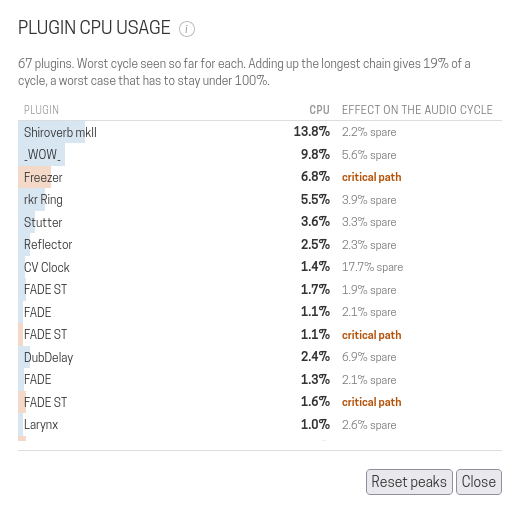
Exactly what I was hoping for the 1st time I clicked on the CPU usage gauge !! Great addition the click → zoom on the desired plugin 
The refreshing rate seams a bit too small, the plugins are jumping very quickly from a line to another, that could be hard to follow.
And I’m not sure what I’m seeing… is the critical path something we have to be worried about ? It only means the plugins uses all the time allowed for its work ? Changing the buffer size doesn’t affect these critical path so it’s a bit confusing…
Can we add memory consumption in the same window 
works nicely
works nicely
works nicely
Wow !! You can even select a square zone… perfect !
works nicely
works nicely
wow, this is amazing !!! I’ll need some time to accommodate with the way this works with the buttons and switches, but it’s a real life changer !!! There we can see that a touch-screen could really help…
Not sure I’ve tested it well, the vu meters seams to stay even when the CPU usage runs above 98%. It’s only when the vu-meter process itself rise above a certain limit ?
These amazing new features are really welcome and life improvements !!! What a progress from the official image 
This Is only for the vu meter inside the plugin setting dialog, the one you don’t have any control of: it’s always added, but he the CPU Is High Is not armed.
About the critical path it’s described pretty well in the nice wiki by Andrea! Plugin CPU monitor · sejerpz/alabs-mod-custom-images Wiki · GitHub
This is so good, even though I have only just scratched the surface. Mind you, I updated from v13.
Stereo cables and teleporting are the things I have spent a little time on. Fantastic! My board looks really clean now.
I wonder if a ‘Show all teleported cables’ button for teleporting might make sense. Just to temporarily switch between cables and teleporting. If you don’t rename your labels, and you use several instances of the same plugin, it is easy to get confused. Especially during rearranging or rewiring. I use several switch boxes, and sometimes for testing purposes even more than usual.
The CPU monitor is also very interesting. It might help to understand where in the signal chain to best place the portal. Before, it was a lot of trial-and-error-rewiring.
The mouse zoom is very nice. One observation I made on several occasions: When you move a plugin after using the mouse zoom, as soon as you “drop” the plugin, the zoom level returns to default. This does not happen when you use the standard zoom method. Unfortunately, I could not reproduce it reliably.
Mmm, I’ve read this paragraph about ten times this morning. I just had it translated by a robot, and now I understand it better… In my opinion, it would be easier to understand if it didn’t include that scary word: “critical”
Maybe “heaviest path” ?
Yeah I think it might make sense to rename it to something less scary
Hi Rom,
About cable teleporting: you can change the label size in Settings-Advanced->user interface. That make it easier to read on a zoom out.
A bit of feedback after I did some testing especially on the new WebGUI features:
Stereo cables, Zoom in and out, controctor smart moving (not sure what to call this feature exactly  ) and multi-plugin selections all awesome features!!
On the last one, is it supposed to work also as a click-and-release, as @StefanD shown here?
I can’t seem to make it work (using Chrome here), yet I managed to make it work while holding Shift, which is also super intuitive! Also really cool that after selecting one or multiple plugins, you can delete them simply by pushing backspace. Again, super intuitive!
On cable teleporting, it took me a while to understand it and I needed to go into the Starless Wiki to do it. I guess I was led by mistake with some talk that it would become an extra audio input on the left of the constructor. But the feature works great!
I will keep testing and especially try the device editor soon. But great work.
Little feedback for future releases: implement some right-click functions with functionalities that have shortcuts. For example, if that existed, I guess I would find the cable teleporting without needing to go to the Wiki. This would make sense as well for the VU meters, etc.
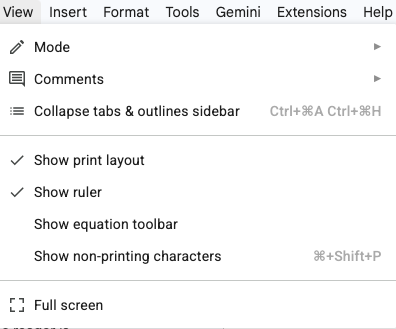
Of course, the shortcuts are awesome and once you know them, the process gets way faster; therefore, it would be great to leave the shortcut for each function listed on this right-click menu. Something like this:
I had the same idea about right-clicking and having teleport as dropdown! Cool that you mention it  I’ll see what I can do for the next release.
For drag-select yes it only ever worked with Shift, because you cannot distinguish otherwise the marquee drag-select from the drag-to-move-screen.
I know it has been asked quite some time ago already. But what are realistic expectation of this also reaching the Mod Duo X?
Really amazing new features!! Thanks!
About Tone3000 support, I’m not sure if I have something wrong in my side, but when I click on the logo I got a web popup and when clicking continue, I get following error, it never asked to sign-in:
| error | “invalid_request” |
|---|---|
| error_description | “http redirect_uri requires a loopback host (localhost, 127.0.0.1, ::1) or an IPv4 literal address; use https for a hostname” |
| request_id | “e05b7485-13ed-4d49-b25f-1ed7a079acca” |
| received_redirect_uri | “http://moddwarf.local/effect/t3k/select/graph/neural_amp_modeler_lv2” |
I tried with different browsers (firefox and chrome) and 2 different PCs…
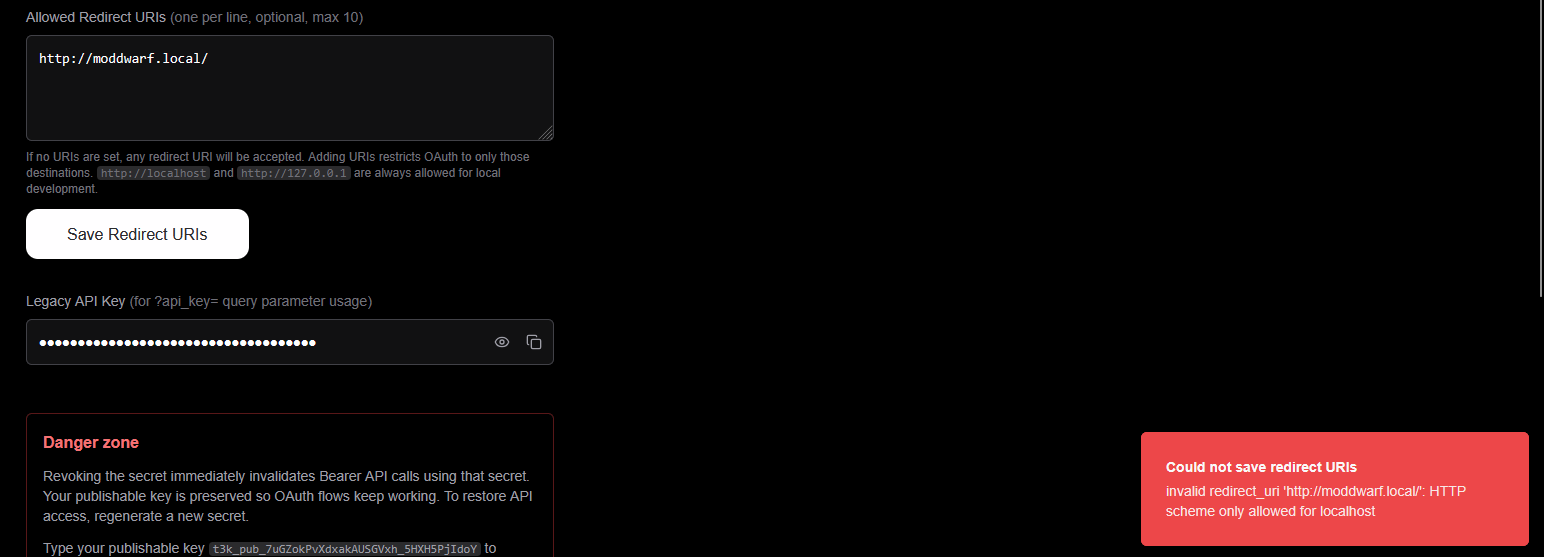
It’s a limit of the Tone3k api: I can’t register http://moddwarf.local on the allowed redirect hosts.
As a workaround connect to your dwarf using the ip address: http://192.168.51.1/
I’ll try to sort this out with T3K support, but don’t get your hopes up too much. 
The web UI: high
The custom controller firmware: low 
Stay tuned.
with ip address: http://192.168.51.1/ is working ! Thanks again
But then USB connection connection is needed. If the limit of the Tone3k api is about the number of allowed redirect hosts, consider that the address moddwarf.local is used for both interfaces: USB and Wifi.
Hi @fer,
Unfortunately, it’s a Tone3000 limitation:
I have a couple of ideas I can try if Tone3000 tells me they can’t support this kind of URL.
EDIT:
If you want to use the Wifi interface just use the IP of that interface. T3K allows all local ip, plus the url I configure in their API interface: the problem is that I can’t configure the moddwarf.local
As long as you use a lan ip everything should work.
That’s good indeed, with the IP, Wifi works aswell