Yes. Any additional metadata added to the pedalboards are ignored by the older OS systems.
2 Likes
Hi everyone,
RC2 is out for Duo, Duo X and Dwarf, codename “Just make sure you do it right the first time”
It’s RC1 plus three fixes for the problems you reported here . Thank you for those who tested 
What’s fixed since RC1
- File picker hid folders that only contain subfolders. An IR pack organised as
"foldername"/<subfolders>vanished from every IR loader, together with everything inside it. All folders show up again. Thanks @Lipi (mod-ui #180) - Plugins with text parameters could disappear or stop responding (e.g. Multi Button CV). If such a plugin was the first one drawn when the page loaded, it didn’t appear in the Web UI at all; otherwise its text fields silently did nothing and typed text never reached the device. Both fixed. Thanks @Remy_D and @mark_melvin (mod-ui #179 + #181)
Nothing else changed: the only difference from RC1 is two Web UI files. Audio engine, plugins and system components are the same as RC1.
Download
| Device | File | SHA-256 |
|---|---|---|
| Dwarf | moddwarf-v1.14.0.3364.tar | 55b9f2248509e9c9a40b0ffe21f865b49d409d2a7ec269cd2e73a2ecf4320874 |
| Duo X | modduox-v1.14.0.3364.tar | e11e245e448e22b40c2bda6568881dc22abb54ad2d53d1cb741364667f9e166a |
| Duo | modduo-v1.14.0.3364.tar | a4f775fff427bada16ffada98369f3ee1686777917683b41873ddbea3ae4c69e |
Known issues / needs info
- MIDI learn not mapping (@Remy_D): we couldn’t reproduce it yet - tried controls, bypass, aggregated and separated MIDI modes, on RC1 and on 1.13.5, all mapped fine. If it still happens on RC2, please tell us which control, what the dialog shows and which MIDI mode you use, and paste a Report a problem text.
- The Stable / Testing setting is still a preference only - it doesn’t enrol your device for automatic updates yet. Please install manually with the links above.
How to report
Web UI → Report a problem → copy the text → paste it here with what you did, what you expected and what happened.
Thanks for testing! 
5 Likes
Thanks @gianfranco ! My problem is resolved (apart from a small problem that is now on my end)!
Is there a guide for getting my plugins into the plugin store (even in Beta)?
Cheers,
Mark
1 Like
@jon will follow up on that very soon.
1 Like
It’s been a while since we’ve had news like this, awesome!
The thing is, I just installed Starless 17 (Dwarf). And I’m shocked at how much it’s improved the usability. I’m not ready to give up these features yet (I haven’t even tried everything). I’m not a techie, and that makes using the MOD device really difficult. And even reading a forum like this (in a language that’s foreign to me) is already quite a challenge (the translation isn’t always accurate). I didn’t understand half of the listed improvements (Beware, Stupid in the chat!).
“Grouped plugin controls”
“Easy Spin”
“Under the hood” — none of this
This means I need to update to understand what we’re talking about and whether I need it. Whereas the stated Starless improvements are clear from the outset. I’ll probably install this MOD update, but after some time, since it’s not yet entirely clear what it will give me.
There were many inconveniences of the Dwarf that had been bothering me for YEARS. For a long time I was going to write a list of things that would definitely improve the user experience (and these are pretty simple, almost obvious things), but due to the fact that the development team is very busy and updates are rarely released, and the community does not report inconveniences, I thought it was OK for everyone and never got around to articulating suggestions for improvement. Fortunately, now, thanks to Starless, half of them have been solved (although some are still troubling). And here’s the Update - and I missed the moment again)) After all, it’s clear that the current work will be focused on fixing minor errors, not on implementing changes.
Nevertheless, thank you very much for the fact that the project is still developing in this way. This is undoubtedly very important for the MOD community.
2 Likes
Thanks for the great updates!
(Suggestion or request: Could you incorporate useful features from alternative OSes into the official ModAudio OS? I also think that some of these features could be very helpful for ModAudio and allow users to bring their ideas to life more intuitively and quickly.
And I’d love to see a kernel for the DuoX that Duo and Dwarf can also use. Having one kernel for all devices would definitely have advantages for you as well—it would mean maintaining it just once.)
Some of the improvements were incorporated from the Starless image, like Tone3000 integration and the PortGroups.
I’ll work on better documentation in order to provide information beforehand. Yesterday I posted A new MOD Dwarf Manual. In an ideal scenario we’ll have the features already described in the manual at the time of publishing.
In any case, what we’re doing here is still testing of an upcoming release.
This is the core idea, and it’s already happening. As I wrote above, some features were funnelled from Starless already. And also we have the upcoming EasySpin plugin, which is not original MOD work.
2 Likes
just installed RC2 on my DuoX LE… no problems so far.
FYI: my MC6 Pro is working fine with this image, including making new MIDI addressings.
4 Likes
Nice update! Thanks
For the moment I only found this bug:
What happened
Once a IR or NAM file is selected, the navigation in folders/subfolders is not allowed
Steps to reproduce
- Create a pedalboard, add a plugin with IR or NAM files
- Navigate through your folders/subfolders and select a file
- After selection, it is not possible to navigate to another folder, only possible to select files from this folder
Expected
Navigation in folders/subfolders should be allowed always
OS release:    v1.14.0.3364  (built 2026 Sep 21 17:22:40)
Device:        MOD Dwarf / dwarf / aarch64-a35 / dwarf:aarch64-a35
Controller fw: 1ce2db7dc1530287eff5f229786354a8d272d50**What happened**9
Kernel:        6.1.15-rt7-moddwarf
Uptime:        0h 34m
Xruns:         1   DSP load: 13%
Pedalboard:    "Untitled" (1 plugins)
  - https://mod.audio/plugins/CabinetLoader
Web UI at:     moddwarf.local
Browser:       Mozilla/5.0 (X11; Linux x86_64; rv:155.0) Gecko/20100101 Firefox/155.0
Update: looks it does not happen with all folders/subfolders probably related to spaces or special characters in the name of the folder or file
1 Like
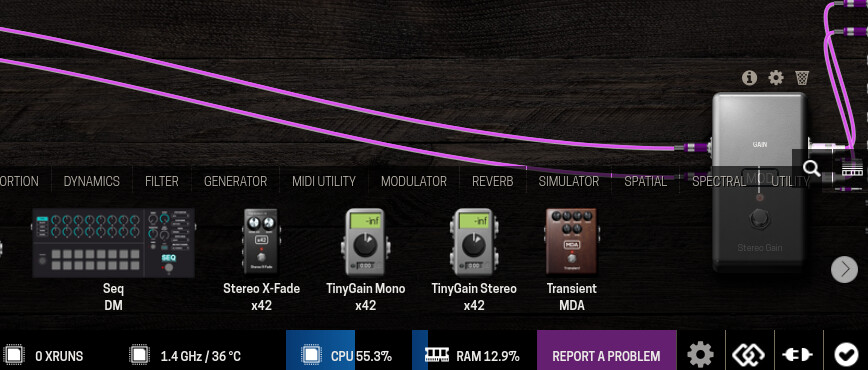
DuoX: During my first quick test, I noticed that an empty padelboard causes about a 30% CPU load; before, it was significantly less (about 1%). Is this the case for other DuoX users as well?
I’ll test it again this weekend when I have more time.
1 Like
hi @khz !
on my DuoX LE, a new, empty pedalboard with this OS build sits at about 4% (128 frames) or 6% (256 frames).
OS release:    v1.14.0.3364  (built 2026 Sep 21 17:23:40)
Device:        MOD Duo X / duox / aarch64-a53 / duox:aarch64-a72.a53
Controller fw: f5fc78b99b9df4f3b2c69c2846289dd865bba752
Kernel:        4.4.167-rt176-duox
Uptime:        0h 15m
Xruns:         0   DSP load: 55.6%
Pedalboard:    "Untitled" (1 plugins)
  - http://moddevices.com/plugins/mod-devel/Gain2x2
Web UI at:     modduox.local
Browser:       Mozilla/5.0 (X11; Linux x86_64; rv:140.0) Gecko/20100101 Firefox/140.0
It ranges from 13 to 37 + percent.
1 Like
Hi everyone,
RC3 is out for Duo, Duo X and Dwarf, codename “They live by a code, that is usually SMPTE”.
It is RC2 plus one fix, and if you use your unit as a USB audio interface, please install it (or turn USB audio off until you do).
What’s fixed since RC2
- High DSP load with USB audio enabled. On RC1 and RC2, with USB audio switched on in the device’s USB settings and the unit plugged into a computer, the CPU meter climbed even on an empty pedalboard: about 30–60 % on a Duo X, 70 % on a Dwarf, and 100 % with xruns on a Duo, whether or not the computer was playing anything. 1.14 had updated one of the audio libraries (
zita-alsa-pcmi) behind the USB audio bridges, and the new version stopped telling the bridge when the USB stream was idle, so it kept the audio engine busy for nothing. RC3 goes back to the library version 1.13.5 ships. Measured on all three models: with USB audio on, the load is now within a couple of percent of having it off. Thanks @khz for the report and @plutek for the comparison figure.
Nothing else changed: the Web UI, the plugins and the system components are the same as RC2.
Download
| Device | File | SHA-256 |
|---|---|---|
| Dwarf | moddwarf-v1.14.0.3365.tar | 718d45df67a10d679f090b56e9cdedb70f280b5e77d79b933cb48a3ea69245a4 |
| Duo X | modduox-v1.14.0.3365.tar | bff8bcf8a345c543760482e7705c0ce28c441cc7b1655e7f77d7a200a7450e44 |
| Duo | modduo-v1.14.0.3365.tar | f07d87960999c5987f85ec63ac47663e90576ae99d09604cb21cabcb0e789218 |
Install
Same as before: on the device, Settings → System Upgrade. The device shows up on your computer as a USB drive; copy the .tar for your device onto it and follow the prompt. It reboots, installs (about five minutes) and comes back on RC3. Your pedalboards and files stay in place.
To go back, install the 1.13.5 file from the Releases page the same way.
Known issues / needs info
- File picker: after selecting an IR or NAM file, navigating to another folder can stop working, apparently with folder names containing spaces or special characters (@fer). Not fixed in RC3, being looked at.
- MIDI learn not mapping (@Remy_D): still not reproduced here, and @plutek’s MC6 Pro works on this build. If it still happens on RC3, the questions in the RC2 post above stand.
- The Stable / Testing setting is still a preference only; it doesn’t enrol your device for automatic updates yet. Please install manually with the links above.
How to report
Web UI → Report a problem → copy the text → paste it here with what you did, what you expected and what happened.
Thanks for testing!
Could you install RC3 and confirm two things: that USB audio is indeed on on your unit, and that the meter is back to a few percent?
Thanks @fer. I haven’t reproduced it yet. Could you give me one folder path where it happens and one where it doesn’t, exactly as they appear in the File Manager, including the spaces or special characters? That could point me straight at the string the picker gets wrong.
3 Likes
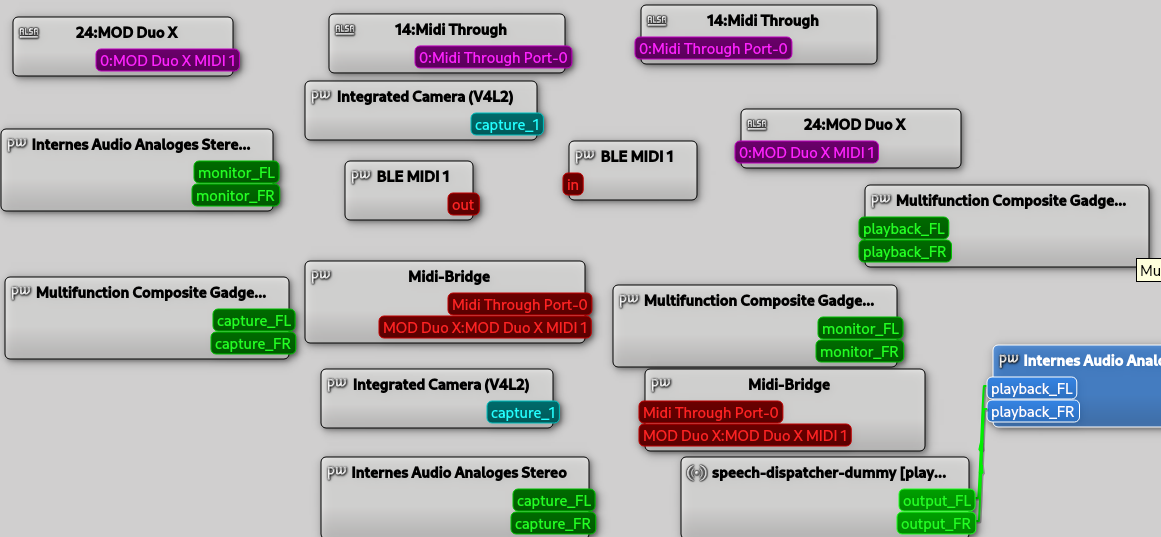
USB MIDI is available on the computer, but USB Audio does not appear.
[root@modduox ~]# nano /data/enable-usb-
enable-usb-audio-gadget  enable-usb-multi-gadget
The CPU is stable again.
OS release:    v1.14.0.3365  (built 2026 Sep 28 10:09:40)
Device:        MOD Duo X / duox / aarch64-a53 / duox:aarch64-a72.a53
Controller fw: f5fc78b99b9df4f3b2c69c2846289dd865bba752
Kernel:        4.4.167-rt176-duox
Uptime:        0h 14m
Xruns:         0   DSP load: 4.2%
Pedalboard:    "Untitled" (4 plugins)
  - http://moddevices.com/plugins/mod-devel/Gain2x2
  - https://github.com/dcoredump/dexed.lv2
  - https://github.com/davemollen/dm-Seq
  - http://gareus.org/oss/lv2/tinygain#stereo
Web UI at:     modduox.local
Browser:       Mozilla/5.0 (X11; Linux x86_64; rv:140.0) Gecko/20100101 Firefox/140.0
Hi @gianfranco, ok the guess was incorrect… The error happens once you select a file which is insides two levels of subfolders. For example /Folder1/Folder2/NAM.nam
Hi everyone,
RC4 is out for Duo, Duo X and Dwarf, codename “It’s what keeps them in sync”.
It is RC3 plus three things, all about using your unit as a USB audio interface. If you don’t use USB audio, nothing changes for you.
One thing to know before you install, if you keep your NAM models or IRs in folders inside folders: the file picker has a bug that locks you in a folder. It is in every 1.14 build so far, RC4 included, and the fix comes in the next build. Details and how to avoid it are under Known issues below.
What’s new since RC3
- USB audio could stay silent after boot (Duo X). On a Duo X, one of the first times the computer started playing after the unit had booted, nothing arrived; stopping and starting again made it work. Fixed.
- A burst of noise when the computer stopped playing (all devices). When the computer closed the USB audio stream, the unit repeated the last fraction of a second of audio for about a second, at full level. Fixed: the stream now ends clean.
- Clearer names for the USB audio ports on the pedalboard. They were called “USB Audio Capture” and “USB Audio Playback”, which is the device’s point of view and the opposite of what your computer calls them. They are now USB From Computer 1/2 (what your computer plays) and USB To Computer 1/2 (what your computer records). Only the label changed: your saved pedalboards keep their connections.
Tested on all three models, measured and by ear. Thanks @khz for the report that started it.
Nothing else changed: the plugins and the rest of the system are the same as RC3.
Download
| Device | File | SHA-256 |
|---|---|---|
| Dwarf | moddwarf-v1.14.0.3366.tar | 609b947c0d24f2a14149c555e3f592145115255d58bf55fff9726d1c739e5bdb |
| Duo X | modduox-v1.14.0.3366.tar | c29bb8d74bdaa221f1c55afe33791d39aa61e6fcbea9862f82ff40d54a952230 |
| Duo | modduo-v1.14.0.3366.tar | 1d695e341432f91a6320882187811622d3431d3c7f5a1d3713d00eec4a13b942 |
Install
Same as before: on the device, Settings → System Upgrade. The device shows up on your computer as a USB drive; copy the .tar for your device onto it and follow the prompt. It reboots, installs (about five minutes) and comes back on RC4. Your pedalboards and files stay in place.
To go back, install the 1.13.5 file from the Releases page the same way.
Using USB audio
USB audio still needs to be manually enabled: Audio Through USB - MOD Wiki . I’m looking into adding this to the Settings page, but not yet.
- Turn it on in the device’s USB settings, then connect the unit to the computer.
- On the pedalboard, connect USB From Computer 1/2 to where you want the computer’s sound to go, and whatever you want to record to USB To Computer 1/2. Like any other input or output, they do nothing until they are connected.
- The output LEDs show the level inside the pedalboard, before the output volume. If the LEDs light up and you hear nothing, check the output volume in the device settings.
Known issues / needs info
- File picker locks you in a folder (NAM models, IRs). When you select a file that sits two or more folders deep (for example
Folder1/Folder2/model.nam), the list stays in that folder and the click to go back no longer works. Three folders deep, going back empties the list, even before you select anything. Files one folder deep, or at the top, work normally. Found by @fer, confirmed here on a device. It is not new in RC4: RC1, RC2 and RC3 have it too; 1.13.5 does not. The cause is found and the fix is tested, it comes in the next build.- To avoid it: keep your files at most one folder deep for now.
- If a plugin is already locked in a folder: reloading the page does not help. Remove the plugin from the pedalboard and add it again.
- Nothing is wrong with your files or your pedalboards; only moving around in the list is broken.
- How the unit is named on your computer. On macOS a Duo X shows up as “Duo X Playback” and “Duo X Capture”; a Dwarf or a Duo shows up as “Playback Inactive” and “Capture Inactive”. On Linux desktops all three are called “Multifunction Composite Gadget”. It is the right device in every case; proper names come in a later build.
- The first fraction of a second of a stream (0.1 to 0.3 s) can be missing while the unit locks onto the computer’s clock.
- Duo: USB MIDI is not available while USB audio is on.
- MIDI learn not mapping (@Remy_D): still not reproduced here. If it still happens, the questions in the RC2 post above stand.
- The Stable / Testing setting is still a preference only; it doesn’t enrol your device for automatic updates yet. Please install manually with the links above.
How to report
Web UI → Report a problem → copy the text → paste it here with what you did, what you expected and what happened.
Thanks for testing!
Thanks @khz, that confirms the CPU fix, 4 % with four plugins is where it should be.
On USB audio: it is there, under a name nobody would guess. In your screenshot the three boxes called “Multifunction Composite Gadget” (capture_FL/FR, playback_FL/FR, monitor) are the Duo X. Linux desktops take that name from the USB ID list instead of from the device, which is why MIDI says “MOD Duo X” and audio doesn’t. aplay -l shows it as “MOD Duo X”.
Looking into it I found two old bugs on the way, both in 1.13.5 as well: after the unit boots, one of the first attempts to play through it could stay silent, and every time the computer stopped playing the unit repeated a second of noise. Both are fixed in RC4 above, and the ports on the pedalboard now have names that say which way the sound goes: USB From Computer and USB To Computer.
Could you install RC4, select “Multifunction Composite Gadget” as the output on your computer, connect USB From Computer 1/2 to the outputs on the pedalboard, and tell me if sound gets through?
Thanks @fer, that was the detail I needed. Found it: the picker remembers the open folder in two different ways, one when you click through folders and another after you choose a file, and the two only agree when the file is one folder deep. From the second level on, after you choose a file the “go back” click is no longer recognised and you stay in that folder. Same cause, second effect: three folders deep, going back empties the list.
I reproduced both on a device here, and the fix is written and tested. It is not in RC4, which was already built when your answer came in; it goes into the next build. RC4 lists it under Known issues.
Until then, keeping models and IRs at most one folder deep avoids it. If a plugin is already locked in a folder, reloading the page does not help; removing the plugin and adding it again does. Nothing is wrong with the files themselves.
1 Like
Thanks!
Once this is solved, I think it will be nice that when you download from Tone3000, the new folder is created inside the actual folder, not the root NAM or IR folder.
1 Like
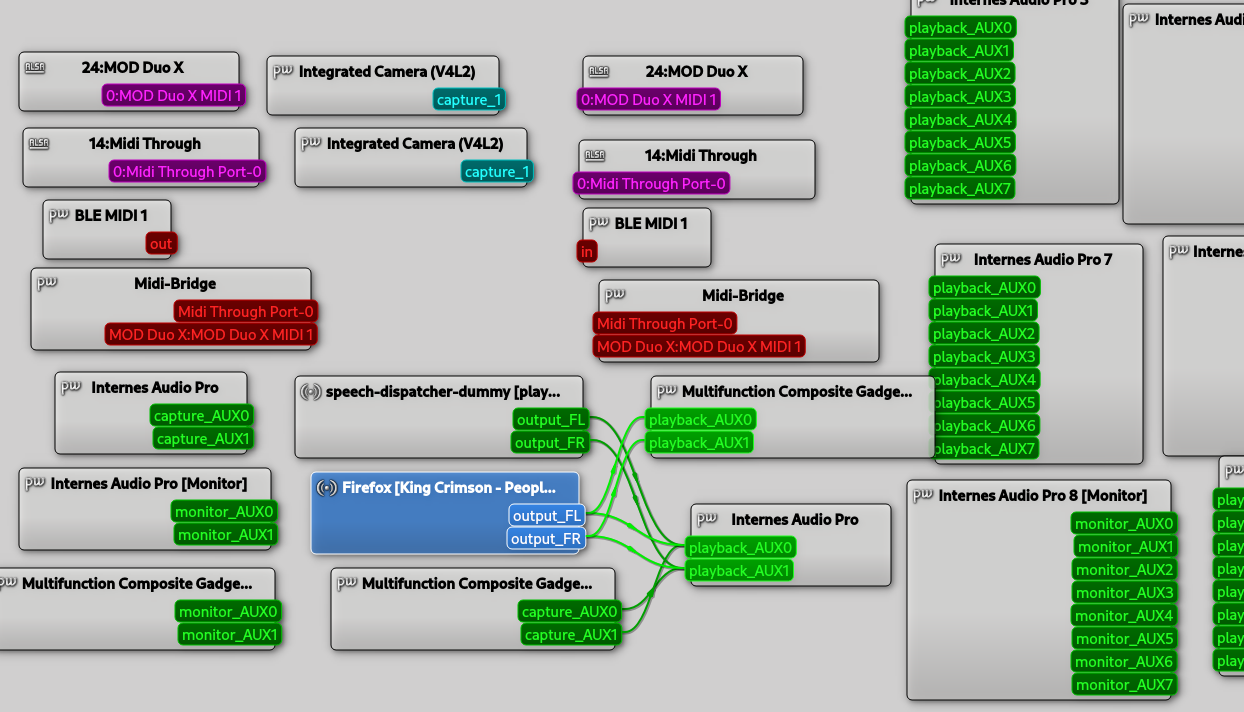
No audio is coming through, neither to the DuoX nor to the computer. Previously, just like with MIDI, the label “MOD Duo X” was visible for audio.
Karte 2: X [MOD Duo X], Gerät 0: USB Audio [USB Audio]
  Sub-Geräte: 0/1
  Sub-Gerät #0: subdevice #0
When you say “audio coming through” do you mean audio coming from the computer not going out via the analog jacks (given you have patched it inside the Duo X, of course)?
Please check the Settings Menu (long pressing the left knob) > System > Outputs and check the output levels. I wasted a bit on time in my unit till I noticed they were set to -99dB…
1 Like