Hi @Inqb8tr-jp, thanks for testing in four DAWs, that helps a lot.
Typing in the search bar: on Linux the plugin window doesn’t take the keyboard, so the DAW keeps your keystrokes. We’re looking into it. Until then, “Open in Web Browser” gives you the same page, and typing works there.
Ardour buttons: Ardour runs with its own copies of some system libraries, and the plugin passes that setup on to the file manager and the browser it starts. They then load Ardour’s older libraries and quit, which matches the errors you posted. The fix is to start them with your normal system setup; we’ll do that for the next build. Meanwhile your files are in ~/Documents/MOD Desktop/user-files.
Fender Studio Pro: could you tell me a bit more?
Which version, and which plugin format did you use (VST3, CLAP, LV2)?
When you open the plugin, do you get a window at all? Is it empty, or does it show the MOD Desktop buttons?
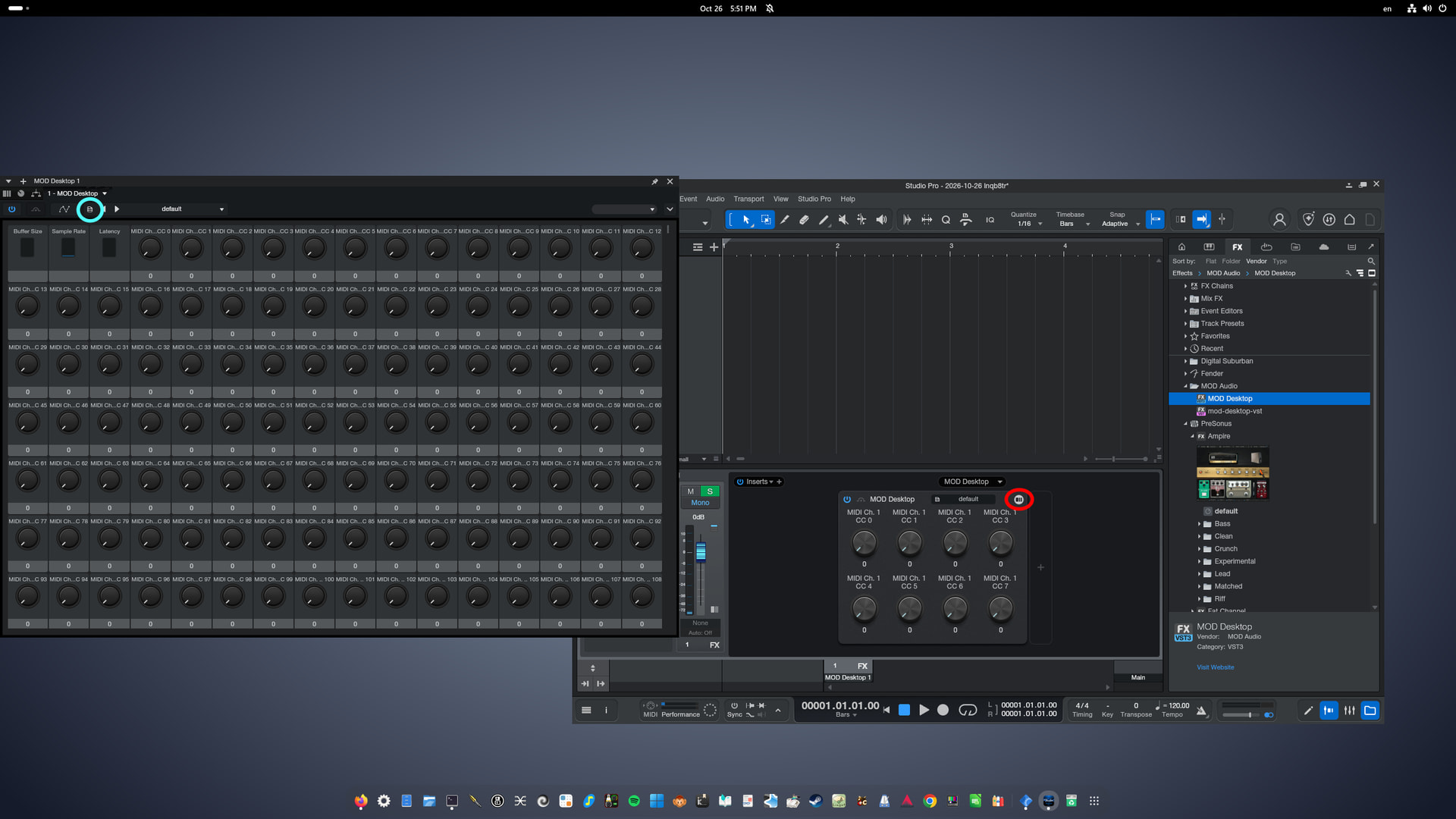
I tested both VST3 and VST2 on Fender Studio Pro 8.1.2 flatpak edition on Debian 13.
When I click the red circle, the window on the left opens.
I can also see the “Show in Browser” menu when I click the light blue button, but clicking it doesn’t do anything.
Hi @Inqb8tr-jp, thanks for the screenshot, that helps a lot!
I had some AI help for this reply, as I have not used Studio Pro myself.
From what I understood, the window you see is Studio Pro’s own control view (the list of knobs), not the MOD Desktop window. Studio Pro does not open our window, so there’s no button to reach the WebGUI from there. I believe"Show in Browser" is a Studio Pro menu entry; it points to Studio Pro’s browser panel on the right, not to the MOD web page.
Two things would help me narrow it down:
Do other plugins show their own window in this Studio Pro? Any plugin with its own interface will do.
Is your desktop session X11 or Wayland? echo $XDG_SESSION_TYPE in a terminal tells you.
If you have a minute: start Studio Pro from a terminal (flatpak list | grep -i studio gives the app ID, then flatpak run ), open MOD Desktop, and paste what the terminal prints.
The flatpak keeps Studio Pro in a sandbox, and that may be why our window doesn’t open there. Meanwhile, could you try opening the web page by hand? With one MOD Desktop plugin loaded in Studio Pro, go to http://127.0.0.1:18195 in your browser. If that page loads, you can work from there.
**➜  ~ flatpak run com.fender.studioapp8
Selected graphics device: AMD Radeon 780M Graphics (RADV PHOENIX)
### Warning: Module could not be loaded: libNNPredictionDispatcher_fd_2_0_1.so: cannot open shared object file: No such file or directory
### Warning: UCNET:Enabled UDP multicast on official port 47809 (1 sockets)
### Warning: UCNET:Local UDP port bound to 44499 (3 sockets)
### Warning: UCNET:Adding server via UDP discovery 192.168.0.33 : tcp 53531 udp 60386 (alive event)
### Warning: UCNET:Server "Plug-in Scanner" (id = "{D8BCC142-530F-4F67-9219-4AC6E0DD1695}.21") resolved at host "192.168.0.33", tcp 53531 udp 60386
### Warning: UCNET:Resolving hostname localhost...
### Warning: UCNET:Connecting to localhost...
### Warning: UCNET:Removing server via UDP discovery 192.168.0.33 : tcp 53531 udp 60386 (leave event)
### Warning: UCNET:Server "Plug-in Scanner" removed.
### Warning: UCNET:Adding server via UDP discovery 192.168.0.33 : tcp 53363 udp 60150 (alive event)
### Warning: UCNET:Server "Plug-in Scanner" (id = "{BF922E37-0141-4451-A88B-0A909E08D6F6}.26") resolved at host "192.168.0.33", tcp 53363 udp 60150
### Warning: UCNET:Resolving hostname localhost...
### Warning: UCNET:Connecting to localhost...
### Warning: UCNET:Started listening on TCP port 34019 (3 sockets)
### Warning: UCNET:Removing server via UDP discovery 192.168.0.33 : tcp 53363 udp 60150 (leave event)
### Warning: UCNET:Server "Plug-in Scanner" removed.
### Warning: UCNET:Server "Studio Pro/8.1.2.113407 Linux x64" registration reply received.
### Warning: [UserProfileManager] Signed out of Firestore
### Warning: [UserProfileManager] Signed in to Firestore
[dpf] SharedMemory::canInit(1) - true
[dpf] MOD Desktop: Initial init ok
[dpf] SharedMemory::canInit(1) - false
[dpf] SharedMemory::canInit(2) - true
[dpf] MOD Desktop: Initial init ok
[dpf] MOD Desktop: jackd exec ok
[dpf] --------------- ready to process! 128 128 | 256
jackdmp 1.9.22
Copyright 2001-2005 Paul Davis and others.
Copyright 2004-2016 Grame.
Copyright 2016-2023 Filipe Coelho.
jackdmp comes with ABSOLUTELY NO WARRANTY
This is free software, and you are welcome to redistribute it
under certain conditions; see the file COPYING for details
482:driver_get_descriptor
JACK server starting in realtime mode with priority 10
self-connect-mode is "Don't restrict self connect requests"
191:ModDesktopAudioDriver
213:Open
534:driver_initialize OK
324:Attach | 1337
Internal client mod-midi-merger successfully loaded
Internal client mod-midi-broadcaster successfully loaded
Internal client mod-host successfully loaded
374:Start
[dpf] MOD Desktop: mod-ui exec ok
ERROR: This system has no python serial support
Using FakeHMI => <mod.development.FakeHMI object at 0x7f46f3f46340>
cc start socket missing
jack client activated
NOTICE: Now scanning plugin 'https://mod.audio/plugins/CabinetLoader'...
NOTICE: Finished scanning 'https://mod.audio/plugins/CabinetLoader'
NOTICE: Now scanning plugin 'http://guitarix.sourceforge.net/plugins/gx_bajatubedriver_#_bajatubedriver_'...
NOTICE: Finished scanning 'http://guitarix.sourceforge.net/plugins/gx_bajatubedriver_#_bajatubedriver_'
NOTICE: Now scanning plugin 'urn:dragonfly:early'...
NOTICE: Finished scanning 'urn:dragonfly:early'
NOTICE: Now scanning plugin 'http://github.com/mikeoliphant/neural-amp-modeler-lv2'...
NOTICE: Finished scanning 'http://github.com/mikeoliphant/neural-amp-modeler-lv2'
Thread setup with realtime priority successful
[dpf] MOD Desktop: Runner setup ok
I’ve been running MOD Desktop, mainly for development (I can eleborate if anyone is interested, but I’ve set it up as a quick way to preview OS changes before pushing to the DUO)
At 128 frames, JACK periodically stops processing entirely. launcher.log then shows DeviceNotificationCallback kAudioDeviceProcessorOverload375 times a second (48000 / 128, i.e. every cycle) for about an hour, after which it either recovers by itself or MOD Desktop has to be restarted. Outside these stalls there are a few xruns a minute.
At 256 frames the same machine ran for 14 hours with no stall (about 1–2 xruns a minute).
Separately: after the Mac sleeps and wakes with the iXR attached, every JACK client fails and is deactivated. jackd keeps running with no audio until MOD Desktop is restarted.
I also get a lot of Xruns with this new MOD Desktop build. Definitely a regression from the previous version. Just like @Whythisreason says it logs DeviceNotificationCallback kAudioDeviceProcessorOverload . I’m running this on macOS too
Thanks both. Niels, your report with the samples made this much quicker to track down. Extra grazie.
I found it and Dave is right that it is a regression from 0.0.12. The issue is the JACK build that 0.0.13 ships.
When MOD Desktop starts, JACK loads the plugin host and the MIDI helpers a moment before the audio device is running. At that moment JACK does not know the audio period yet, so it asks macOS for real-time scheduling with all timing values at zero. macOS refuses, JACK does not notice, and the plugin host runs as an ordinary thread. On a quiet Mac that mostly works; as soon as something else uses the CPU (a browser, a game, Spotlight) the plugin host is late, and every late cycle is an overload. 0.0.12’s JACK started the audio device first, so it never hit this.
On a Mac mini M1 at 128 frames with background load:
This is 0.0.13 with only the JACK fix, so it tests just this problem. It installs over 0.0.13 like a normal update (app and DAW plugins). Like 0.0.13 it is signed but not notarized: if macOS blocks it, go to System Settings > Privacy & Security and click “Open Anyway”.
What helps most: run your usual setup at 128 frames for a while, with whatever else you normally have open, and tell us whether you see xruns or stalls, and how many. If it holds up, the fix goes into the full 0.0.14 for macOS, Windows and Linux.
The files are probably root-only because your build machine has a strict umask (077), and the installer copies those permissions across. A chmod -R a+rX on the app before packaging fixes it for everyone.
I’ll change permissions my end to fix it. just fyi
I’ve installed this for testing. How can I copy existing pedalboards from my hardware to my system to edit on this desktop version? Also, is there any legend available for the inputs and outputs when it uses your hardware? or do you just guess/trial and error?
There is not a system for making this in a simple manner. Not yet. 1.15 will have a way to export plugin presets and I’ll see if I can also make the same for Pedalboards.
But here are some instructions in case you are willing to do some power user actions. I hope it helps:
What you need
The unit connected to the computer over USB (the web interface opens at http://192.168.51.1).
ssh and scp on the computer: built in on macOS and Linux; on Windows 10/11 use PowerShell (OpenSSH is built in).
The unit’s root password: mod.
MOD Desktop installed and started once (it creates its folders the first time it runs).
Where pedalboards live
Pedalboards
Files used by plugins (NAM models, IRs, samples, …)
MOD unit
/root/.pedalboards/<Name>.pedalboard/
/data/user-files/<category>/
MOD Desktop, Windows
Documents\MOD Desktop\pedalboards\
Documents\MOD Desktop\user-files\<category>\
MOD Desktop, macOS / Linux
~/Documents/MOD Desktop/pedalboards/
~/Documents/MOD Desktop/user-files/<category>/
A pedalboard is a folder ending in .pedalboard (name, connections, plugin settings, snapshots, addressings, screenshot). Always copy the whole folder.
The category folders have the same names on both sides: NAM Models, Reverb IRs, Speaker Cabinets IRs,Audio Samples, Audio Loops, Hydrogen Drumkits, SF2 Instruments, SFZ Instruments, Aida DSP Models, …
From the unit to MOD Desktop
On the unit, save the pedalboard.
List the pedalboards on the unit to find the folder name:
ssh root@192.168.51.1 ls /root/.pedalboards
Quit MOD Desktop.
Copy the folder (macOS / Linux; on Windows replace the destination with "$HOME\Documents\MOD Desktop\pedalboards\"):
(Or switch the unit off and on.) Then reload the web interface.
The pedalboard is in the Pedalboard Library. To reach it from the unit itself, add it to a bank.
Things to know
Same name = overwrite. If a folder with the same name already exists on the other side, scp writes over its files. Rename one of them first (rename the folder, or save under a new name before copying).
Plugins. MOD Desktop comes with a fixed set of plugins. A pedalboard from the unit with a plugin that Desktop doesn’t have will show it as missing. On the unit, missing plugins can be installed from the Plugin Store.
Hardware assignments. Knobs and footswitches assigned on a Dwarf, Duo or Duo X do nothing on Desktop, and a Dwarf pedalboard’s assignments don’t map one-to-one on a Duo X. MIDI assignments carry over. Check them after the move.
Plugin versions. If a plugin is a different version on each side, settings may differ slightly.
Without SSH (one way only, unit → Desktop): Settings → Backup & Restore → “Backup user data” writesuser.tar into a mod... folder on a USB stick. Open user.tar on the computer (7-Zip on Windows; double-click or tar -xf on macOS / Linux) and copy the folders from its .pedalboards folder into Desktop’s pedalboards folder. The backup does not contain the files from user-files, so copy NAM models / IRs separately (File Manager in the web interface). Don’t use Restore to move pedalboards onto a unit.
 .