Going to test tomorrow (finally  )
)
1 Like
ah too late, we just pushed it to stable. but any testing is still appreciated!
since it is based on a plugin we already have in stable (the mod convolution loader, for reverb IRs) we are confident enough that the plugin behaves as expected. all known issues have been fixed.
5 Likes
jup, indeed, no issues.
Being able so select a cab IR on “the front” of the plugin felt really handy.
I like it!
This got me thinking out loud to simplify my workflow.
I often encounter cabs that are great but nearly there
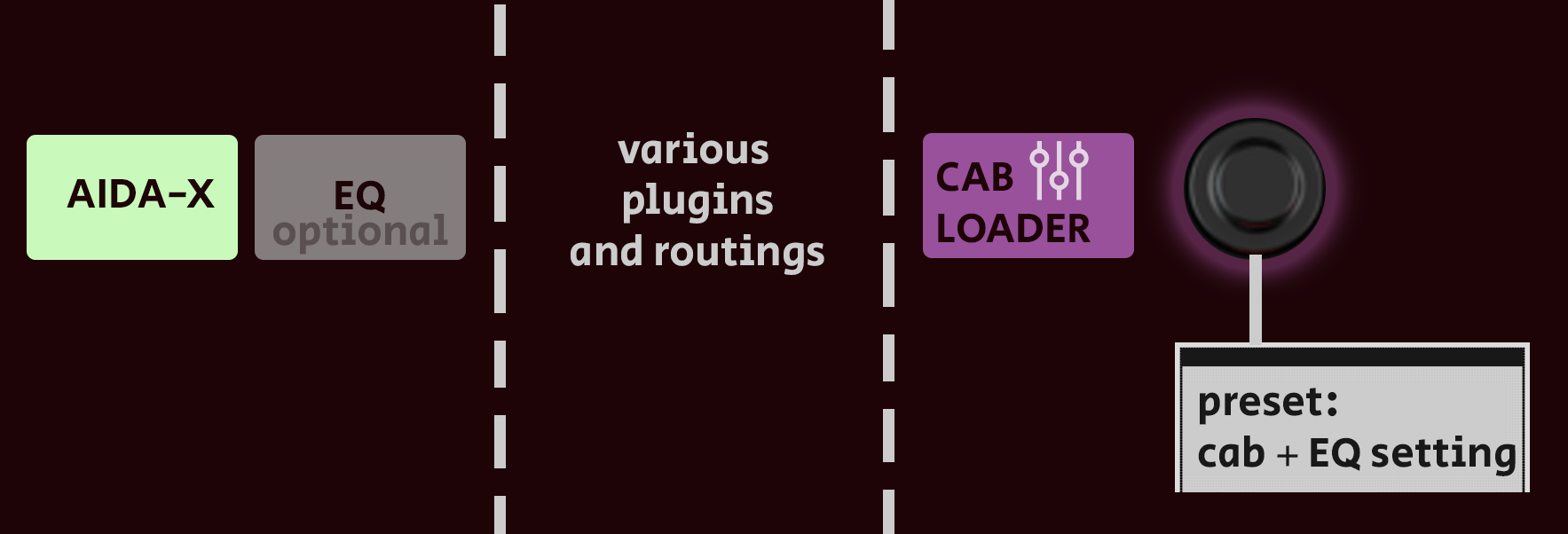
It would make sense to attach a basic EQ on CAB level (instead of having to add en EQ per cab etc)
It would declutter the interface and make my EQ remain “tied to my amp” while I could have rotary button presets of a CAB and its corresponding EQ
Low pass (optional for me)
low
mid
high
high pass (optional for me)
3 Likes
Mikko 2 has a built in eq and it’s a game changer!
I’m seeing strange behavior on my Dwarf where the plugin loads the correct IR when I open the pedalboard, but the MOD GUI doesn’t show which one is selected. Anyone else see this?
I don’t have this problem on my DuoX.
Meta: Do you have a custom color scheme set in your browser and could this be related to that?
1 Like
make sure you have all plugins updated, there were some issues similar to this a few weeks ago but should have been resolved by now
4 Likes
Oh, I see what happened. Because I had a pedalboard currently loaded that uses the plugin, it didn’t get updated. Fixed!
5 Likes
Hi all, sorry to unearth this topic. I’ve just loaded up the MOD Cabinet loader for the first time, and I’m seeing the plugin, but no cab IRs. I’m also not able to load up any. What could be the reason?
EDIT: never mind. Once I reloaded the pedalboard, my own IR files showed up
5 Likes
yes, you need to reboot the pedal for uploaded files to show up indeed 
1 Like
Hi! New user here and I’m using the web version (honesty blown away by how nice it is), but a small suggestion for improvement that almost drove me crazy was that I for the life of me couldn’t figure out how/where to add IRs to MOD Cabinet Loader (or NAM models) when there wasn’t a File Manager button in the bottom left as the manual refers to. Opening the plugin settings only shows a blank space and no indication on where those folders are, same for NAM.
Long story short, I don’t think it’s shown to the user that these folders are located in ~/Documents (in Linux at least) and it took me embarrasingly long time to figure that out. I kept searching the apps own directories. The problem obviously lied with me here, but a little helping text label about that could be sweet for new users (or at startup, or first time the plugin is loaded or wherever).
Just my 2 cents but thanks for excellent software, looking forward to seeing this develop!
3 Likes
Hey @tgarder, welcome on board
I guess you meant the MOD Desktop version.
The MOD Desktop is still in a really early beta stage. The File Manager is exactly one of the points that make it more “beta”, it’s not yet really well implemented. Another side of its beta condition is on the documentation (my world). I will eventually slowly create a Wiki page to document better the MOD Desktop, but a version 1 (and stable) of it would make it more of a priority. IMO, documentation is even a requirement for version 1 to be released.
Anyway, I have on my “to do list” a manual for the MOD Desktop, and your feedback will go straight to the bucket for it.
2 Likes