Ok so I’m a worship pastor at a church and I had a major problem.
I tend run the click with my phone and a soundbrenner app and watch. I can preset my set list bpm so that I can toggle from song to song. Most Sundays we do 4-5 songs.
However I also run the backing synth track through an Atmosphere Aerospace.
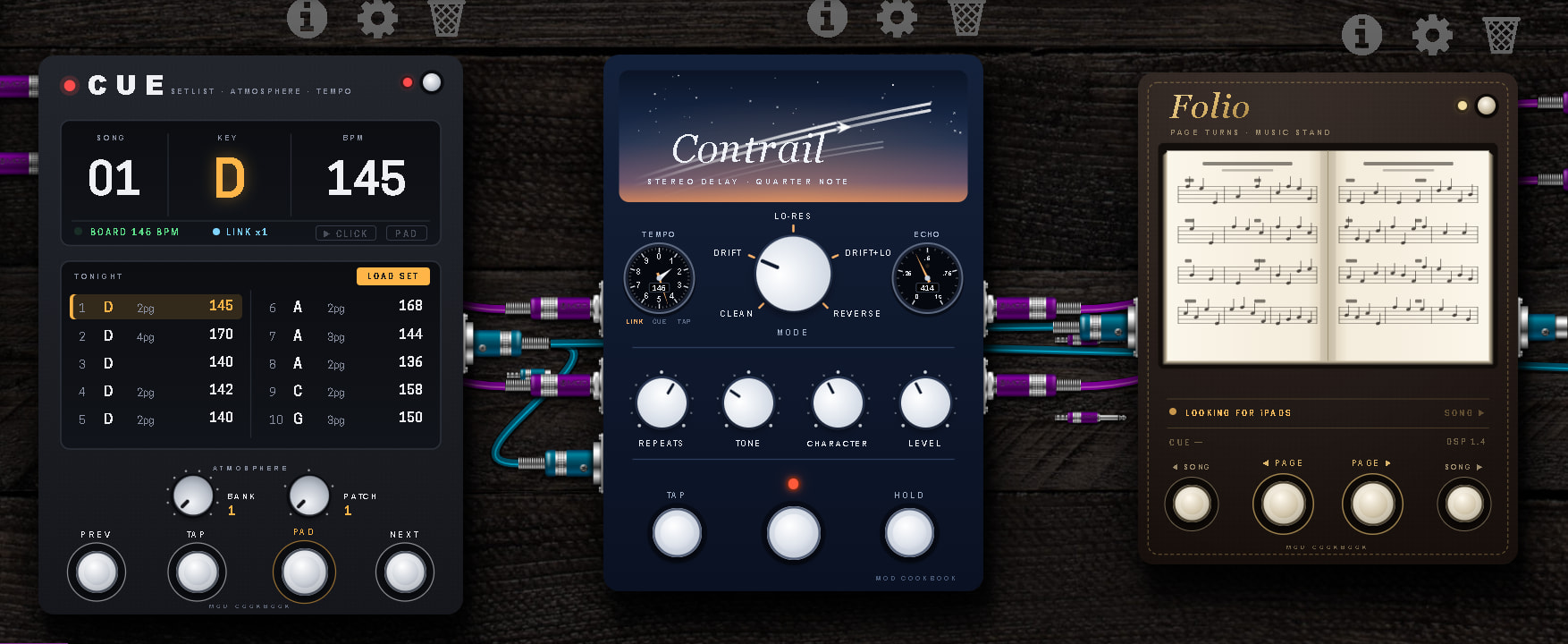
What I was tired of doing was having to adjust the click, the atmosphere, and my delay bpm for each song so I had AI write up a plugin called Cue which allows me to set up and trigger the backing synth pad up to 10 songs and cue it up also with the bpm for each song. I proceeded to add BPM controls via Midi from the Cue pedal and sent that to my delay pedal which I proceeded to also add an altimeter so that I could visually see the BPM changing when looking at the board.
I’m able to link the Soundbrenner app on my phone to the Dwarf via Ableton Link.
I also use Music Stand on an iPad and because that has Midi functions I had AI write up Folio as a midi controller for music stand so that I could assign those to foot switches as well. The interesting part was that in order for it to work I had to download a midi bluetooth network app for the iPad but I was able to run both the click track and the Music Stand App flawlessly.
Feeling frisky before church this morning I redid Cue so that it would also track and trigger Folio to the right song. Every week I will have AI grab my set list and it will give me a list that looks like this: D145x2 D128x3 G150x3 G140x2
That shows 4 songs. The first two songs are in the key of D major, with 145bpm, and the song is two pages. The second song has a 128bpm and is three pages. Make sense?
How I map it is on the first page of my Dwarf I have the Pad button that launches the pad and the click track. If I need to kill the click because the band got off I just hit the pad again and it kills the kick while leaving the pad on. To deactivate the pad I hold the pad button. When I hit next, Cue cues up the key of the next song, the bpm of the click, the bpm of my delay adjusts, and the next song pulls up on my iPad.
The transitions are smooth and fast. What do you guys think?
 It looks like it has got a pretty well thought out UX too. Nice!
