Hi everyone,
What is the logic behind the sorting of the user presets in the plugins detail from the web interface. There is some index anywhere? Some way to sort the presets as we want?
Thanks
Hi everyone,
What is the logic behind the sorting of the user presets in the plugins detail from the web interface. There is some index anywhere? Some way to sort the presets as we want?
Thanks
I figured out.
The order is the the alpha-numeric order of the presets folders in the ~/.lv2 folder.
The web ui creates the presets folders using some type algorithm by adding numerals between the plugin type descriptor (ex: mapcc) and the name given by the user. This is why the presets apear randomly. So, to get a nice sorting order we need to change the folder name and the referencies to the folder in ALL pedalboards.
I made a simple bash script to do that, but before we change the folder name, we must confirm if the ttl file inside the folder is realy related with the name we want to give to the folder. The name of the ttl file is create with the name given by the user in the web ui, and that is the name shown in the web ui. In my case, this command let me compare the folders and the ttl files:
[root@modduo ~]# find .lv2/* -path */mapcc* -name FCB*.ttl
And this the output:
.lv2/mapcc_111114-FCB01.lv2/FCB01.ttl
.lv2/mapcc_111114-FCB02.lv2/FCB02.ttl
.lv2/mapcc_111114-FCB03.lv2/FCB03.ttl
.lv2/mapcc_111114-FCB04.lv2/FCB04.ttl
.lv2/mapcc_111114-FCB05.lv2/FCB05.ttl
.lv2/mapcc_FCB01_VDL01_GAIN.lv2/FCB01_VDL01_GAIN.ttl
.lv2/mapcc_FCB01_VDL02_LEAD.lv2/FCB01_VDL02_LEAD.ttl
.lv2/mapcc_FCB01_VDL04_VLS.lv2/FCB01_VDL04_VLS.ttl
.lv2/mapcc_FCB02_VDL01_GAIN.lv2/FCB02_VDL01_GAIN.ttl
.lv2/mapcc_FCB02_VDL02_LEAD.lv2/FCB02_VDL02_LEAD.ttl
.lv2/mapcc_FCB02_VDL04_VLS.lv2/FCB02_VDL04_VLS.ttl
.lv2/mapcc_FCB03_VDL01_GAIN.lv2/FCB03_VDL01_GAIN.ttl
.lv2/mapcc_FCB03_VDL02_LEAD.lv2/FCB03_VDL02_LEAD.ttl
.lv2/mapcc_FCB03_VDL04_VLS.lv2/FCB03_VDL04_VLS.ttl
.lv2/mapcc_FCB04_VDL01_GAIN.lv2/FCB04_VDL01_GAIN.ttl
.lv2/mapcc_FCB04_VDL02_LEAD.lv2/FCB04_VDL02_LEAD.ttl
.lv2/mapcc_FCB04_VDL04_VLS.lv2/FCB04_VDL04_VLS.ttl
.lv2/mapcc_FCB05_VDL04_VLS.lv2/FCB05_VDL04_VLS.ttl
In this case I already have my mapcc presets ordered, and they apear in this order in the web ui. The script is as follow (run this from MacOS/Linux connected to the Mod Duo by usb cable, don’t forget to run “chmod +x script_name.sh” to make the script executable. Reboot the Mod Duo after change the folders names to apply):
#!/bin/bash
if [ $# -ne 2  ]
then
echo "Rename lv2 presets folders. This not change the presets names. The goal is to change the name of the folders to sort them as we want."
echo
echo "Usage: $0 <OLD NAME> <NEW NAME>"
echo
echo "Ex: $0 mapcc_1111-MY01_PRESET_NAME.lv2 mapcc_MY01_PRESET_NAME.lv2"
echo
exit 1
fi
clear
if ssh root@modduo.local ls .lv2/$1 &>/dev/null
then
echo "Ok! Folder $1 exist"
else
echo "The folder $1 does not exist"
exit 1
fi
if ssh root@modduo.local ls .lv2/$2 &>/dev/null
then
echo "Error! Folder $2 already exist. Please delete de folder/preset first if you want to change the folder name"
exit 1
else
echo "Renaming folder"
fi
ssh root@modduo.local mv .lv2/$1 .lv2/$2
echo "Changing folder referencies in pedalboards..."
echo "(this may take a while, depending of the number of pedalboard in the Mod Duo)"
ssh root@modduo.local "find .pedalboards/ -type f -exec sed -i 's/$1/$2/g' {} +"
This code is aproved by the Mod gurus?
Hi @c0ntact0!
Thank you for your work and sorry for the headaches.
Since I am new to MOD I also had to investigate this issue. This post relates to version 1.6.1.601.
First to the plugin preset ordering: When you save new presets they stay in creation-order until you reload the webpage. After reloading, the presets are in the same order as the filesystem lists them. If your preset label starts with a number or an underscore, the resulting order is even more unforeseeable.
Onto your script: Thank you for you effort and for publishing your work. But I cannot “guru-approve” this.
So here is a description how you could do it manually:
I hope this helps you out of the trouble.
Best regards
Jakob
This is not true. The pedalboards reference plugins by URI and store a snapshot of all values themselves.
Best
Jakob
Hi @Jakob,
Thanks for the replay and comments.
You are rigth, the original files are created using “-” insted of “_”.
The goal of the sed it’s not to rename the preset (the real name) but to change the “pedal:preset” URI in the ttl file to comply with the new bundle name.
Regards
Rui
Right, but I thing if we don’t change the “pedal:preset” URI the preset will not be selected in the web ui user presets list because the URI is pointing out a non existing bundle.
I don’t have my Duo with me now to confirm this, but I thing that it’s the logic behind that URI.
Rui
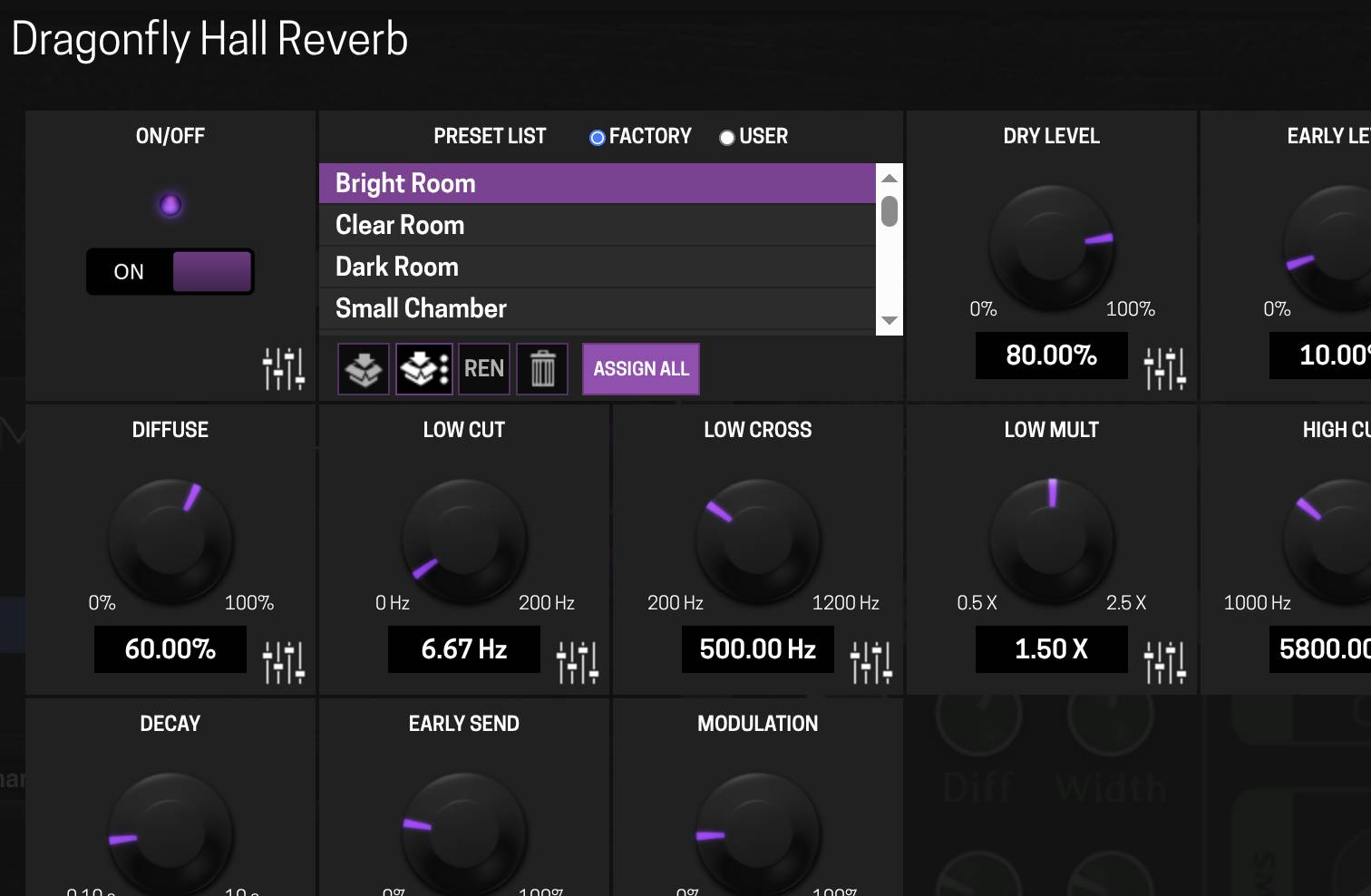
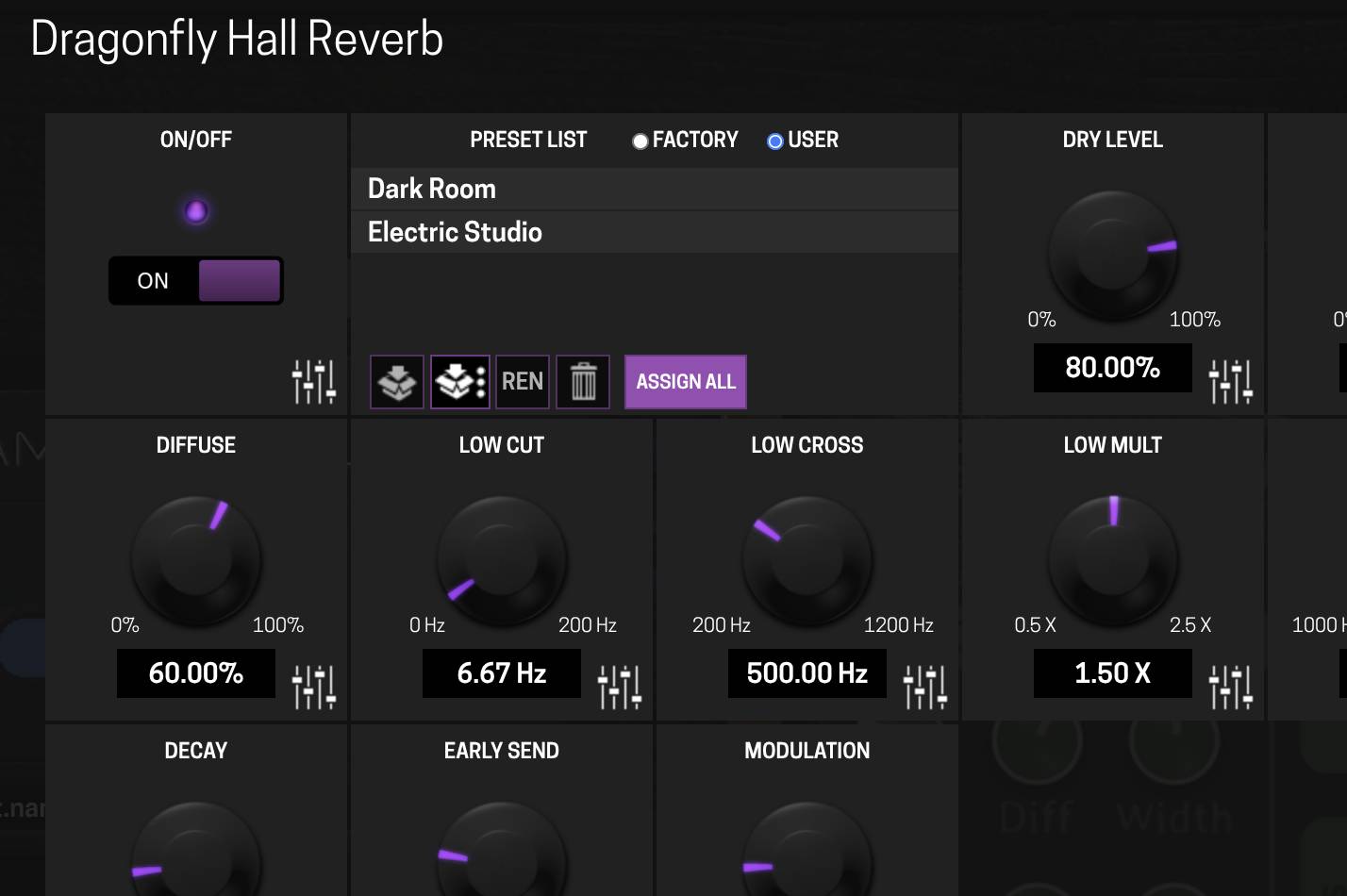
I put my user presets on a button on my MOD Duo X, but instead it also spilled the whole stack of work presets on the click-through button as well. I wanted basically 3 hall presets, now I have that an 20 work presets I never wanted 
Hey @tiktak,
I’m not sure if I fully understand your issue. But likely you saved something as a plugin preset and to access it, you need to go through all the plugin factory presets + your presets. Am I right?
Would using device snapshots not solve your issue?
Hi João, thanks for gettongnin touch!
Sure, here photos… Seems, like the assigning my user presets get scrambled together with the factory presents.
(I’ve tried to upload my screenshots. But the form system denied me that- maybe because I’m new)
Sorry, I wrote 'here are some photos '…here they are:
So, after assigning my user presets to a button on the physical unit, I do now have Factory AND user presets.
Think, this appears only on that dragonfly reverb
I upped your permissions. You should be able to edit now.
Hey @tiktak,
this is actually a downside of using assignments for plugin presets.
My suggestion would be to use pedalboard snapshots. Each stored with the right preset.
Since the sort is alpha-numeric on the preset folder names, the pragmatic workaround is to give yourself an explicit sort key rather than fighting it: prefix names with zero-padded numbers (010_, 020_, 030_) and leave gaps. The gaps are the important part — when you want a new preset between two existing ones you rename one file instead of renumbering the whole set, which is what makes this tolerable long term.
Worth knowing that plain 1_, 2_, 10_ will sort 1, 10, 2, which is the usual surprise here. Two digits handles most rigs, three if you’re building a big library.
If you’re renaming a lot of them at once, doing it over SSH with a small shell loop is much faster and less error-prone than the web UI, and it also lets you keep a text file listing the intended order, which becomes your source of truth if you ever rebuild the device.
On @jon’s snapshot suggestion: it’s the right answer for performance recall, but it does mean the preset order question moves rather than goes away, since you then want your snapshots ordered. Same prefix trick applies there, so it may be worth adopting one numbering convention across both rather than inventing a second one later.
@HelenMarsh is right. The Snapshots approach will save you on a performance level and for a single pedalboard. It won’t save you on the plugin preset level.
Yet, you can do a mix by storing plugin presets and using the pedalboard snapshots to re-call the one you want.
Understood, thanks!