I installed it on my Mac M2. I noticed that the user-files directory was empty (no folders), but I copied all mine over from the Mod App and it works.
Thank you for adding some plugins - the tuner, distortions, and recorders are appreciated.
I installed it on my Mac M2. I noticed that the user-files directory was empty (no folders), but I copied all mine over from the Mod App and it works.
Thank you for adding some plugins - the tuner, distortions, and recorders are appreciated.
in which OS?
Hi.
I wrote some articles about MOD Desktop App on a Japanese tech blog.
Please let me know if you don’t want me to do it.
Hi! How i can extract my pedalboards from backup USB and load them into MOD Desktop? Most important in MIDI sequencers and some effects… P.S. I don’t have access to the hardware unit.
if you have the usb stick with you, you can just open the tar file and extract the pedalboards.
there is a “pedalboards” folder in the user data for the desktop app (save any pedalboard on mod-desktop-app if not), you can just extract/copy the *.pedalboard folders in there
there are likely going to be missing plugins, not everything has been ported to work on the desktop side.
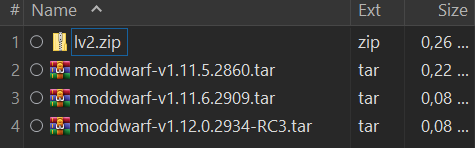
I just unpacked ModDwarf.zip it with Winrar, and got these files. No pedalboard folder… I also all unpacked .tar, and there is also no pedalboard folder.
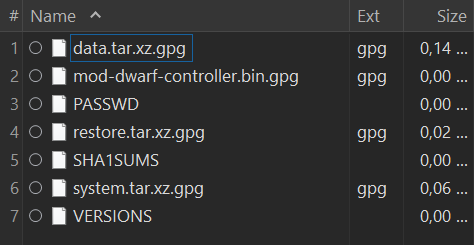
maybe hidden folders? on MOD the /root/.pedalboards are where pedalboards are located.
hidden folders are enabled in my file explorer.
then I dont think your backup includes any pedalboards
Alright! Thanks!
macOS 13.5.2 (22G91)
Apple M2 Pro
I ran MOD Desktop App for a few hours at rehearsal last night. Ran it at 64 frames, NAM + IR, got some compliments on the tone. I didn’t check before I started, but the battery is still at 84%.
I’m using the desktop app in linux + JACK, but I don’t understand how can I connect MIDI to the app.
if MIDI is enabled and nothing is blocking access to ALSA MIDI devices, then it should “just work”.
there is no split midi view for now, all devices go through the same MIDI IO on the pedalboard
I don’t think I got it. In JACK graph I see no midi input ports in the mod app “block”. How can I wire, say, an external sequencer app’s midi output or a virtual keyboard to the app?
As falkTX said: it’s opening the ALSA midi devices directly.
Not sure how we can pass midi in/out of the mod-app on Linux from/to other programs this way.
you cannot do this, not at the moment anyhow. only physical devices are supported at the moment.
Just two questions from an OSX Mojave user.
Thanks in advance
