Fade Plugin

Fade — crossfade between two inputs, so delay tails don’t get chopped
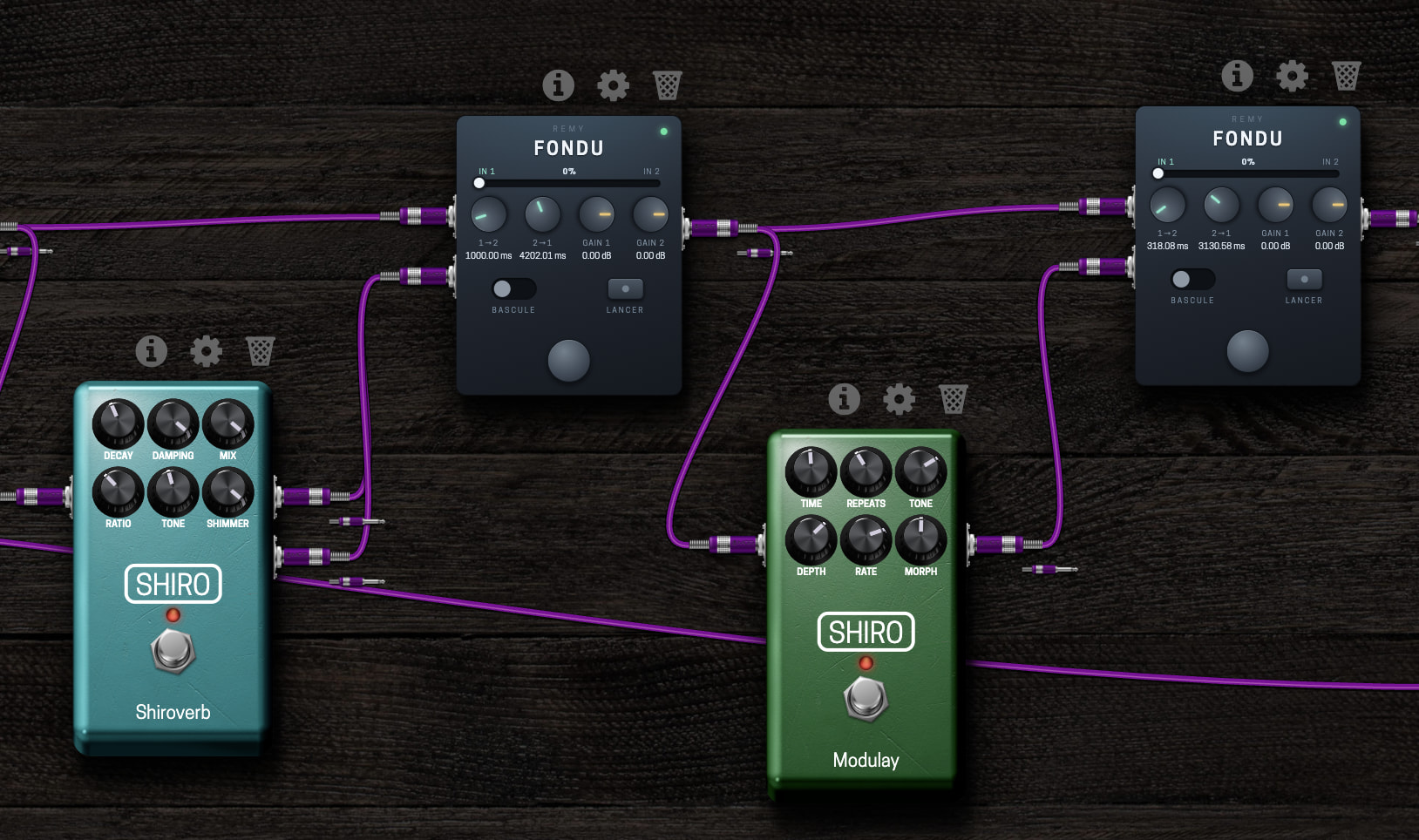
Switching a delay or reverb off with a normal bypass cuts the sound dead — the tail you were counting on just disappears. That’s what this fixes.

Send the dry signal to IN 1, the effect chain to IN 2, and a switch crossfades between them over a time you set, so the tail rings out instead of being cut. The two directions have separate times, so you can leave the effect fast and come back slowly, or the reverse. There’s also a gain per input, to match the levels of the dry and the wet chain before the fade, and two controls driving the same state — a toggle for a footswitch and a trigger for MIDI, since a port can only take one addressing.

Installing, no terminal needed

Download install.html from the repo (open the file, then “Download raw file”). Upload it to your device’s User Files with the File Manager in the MOD web interface, then open it from the File Manager — the plugin is embedded in the page, and there’s one button. Opening it from your own disk won’t work: the browser blocks the request, it has to be served by the device.

Or with the terminal

Grab fade-aarch64.tar.gz from the repo, then:

rm -rf /tmp/fade-inst && mkdir -p /tmp/fade-inst
tar xf fade-aarch64.tar.gz -C /tmp/fade-inst
cd /tmp/fade-inst
COPYFILE_DISABLE=1 tar czf - --exclude='._*' fade.lv2 \
  | ssh root@192.168.51.1 'rm -rf /root/.lv2/fade.lv2 \
      && tar xzf - -C /root/.lv2 && systemctl restart mod-ui'

On macOS the COPYFILE_DISABLE part isn’t optional — without it the archive carries ._* files, lilv mistakes them for bundle directories, and the plugin fails to load. Cost me an evening.

aarch64 only. Source, tests and full instructions are in the repo, ISC licensed. Feedback welcome, especially on the web UI — I’ve only seen it on my own machine.

9 Likes

Tip: don’t put your tar.gz in git. Instead create a release and upload the release binary there.

2 Likes

Thanks Rémy, very useful ! Great UI !
Again, a bit of CPU saving by replacing some Stereo X-Fade + Slew Rate Limiter and Gain - MOD Audio !!!
Bravo et merci !

Some mini-problems :

  • the UI is a sardine can in the plugin bank
  • when I want to place the plugin in the pedalboard, the Starless’s UI suggests to replace CV plugins instead of audio plugins.

And, do you think it would be possible to make a stereo version ?

2 Likes

You can download the new and stereo version here :

Tip: don’t put your tar.gz in git. Instead create a release and upload the release binary there

→ How do i upload the binary here ?

For installation :
tar xf fade-aarch64.tar* -C /tmp && cd /tmp && COPYFILE_DISABLE=1 tar czf - --exclude=‘._*’ fade.lv2 | ssh root@192.168.51.1 ‘rm -rf /root/.lv2/fade.lv2 /root/.lv2/fondu.lv2 /root/.lv2/._* && tar xzf - -C /root/.lv2 && systemctl restart mod-ui’

2 Likes

As I said: create a release and upload the binaries there.

Pushing release binaries to git is very very bad. Don’t do it.

Thanks ! Perfect !

I have a really issue with the progress bar on the UI and its button in the config panel of the plugin :

  • I can’t move the progress bar with the mouse
  • the progress button in the config of the plugin doesn’t seam to do anything

→ I was expecting to get manually from one input to the other, I may have it wrong though.

This is in both mono and stereo plugins.

Yes i understand but how do i upload binaries on the forum. Do i have to use a google drive link or there is something one the forum to upload files ?

You don’t need to upload binaries to the forum, you upload them to your release on github.

Thanks it s done

https://github.com/remy-live/Fade/releases/tag/V2.0

3 Likes

Thanks @Remy_D !!! Your fast !!!
Merci beaucoup !!!
The progress bar and the button are working nicely !

Is it possible to take the time set to the cross-fade when I change the value of the manual button ?

I control this button with a random CV value, without a little slowing I ear some clicks. Here is the part of my pedalboard where it happens :

(replace the X-Fade by the Fade Stereo and reconnect the CV “auto in tempo or expression pedal” to the manual button of the Fade-stereo)

1 Like

(Just wanted to say that your “simple” sample sounds great! :slight_smile: Really pretty…great playing!

1 Like

:blush: Thanks, I was working this Bach’s BVW 997 :

3 Likes

Yeah…Kind of spotted some classic guitar there :slight_smile:

1 Like

Hi @Remy_D

It seams the **Manual** always load at 100%. It’s percentage is not saved with the pedalboard, do you confirm ?

thanks

I’ve published a new release, could you test it

1 Like

Hi @Remy_D

Thanks !

I’ve installed the 2.1, but the problem is always here.
(when I click on the i to verify I’ve the 2.1 version, it shows 2.0)

I can’t share a pedalboard, I made a very simple one with only the FADE Stereo, put the manual pot at 50%, and reload the pedalboard :

  • the UI and the sound are at 100%.
  • the pot in the :gear: parameters is at 50%

Hi @Remy_D
I forgot to say the error was on my pedalboard ! Deleting and putting back the fade plugin get it right, I don’t know why.

And your plugins solve a longtime bug of the Stereo X-Fade - MOD Audio : when you loaded a pedalbord with this plugin, it was always at 50%… so you had to manually change it each time you load the pedalboard.

@jon , do you think this plugin could make its way to the official store ?

Yes. We need of course to evaluate somehow the general interest of the community on it. I would say that sharing feedback about the plugin would be already enough (if there’s absolutely no talk about it it will feel that “noone cares”, altought that can be sometimes misleading and we still need to understand how we go around that).

I have almost the publishing setup ready and after “moving” those beta plugins I would like to bring something new to the platform. Lot’s of great things have been shared in the last few months and I don’t want them to fall in a bottomless bag.

2 Likes

Hi @Remy_D , could you please check “toggle” / “manual” parameters? I get inconsistent states when i recall a saved pedalboard (i’m using Fade Stereo).

Thanks

Damn, I really enjoyed that @Rom Sunny Sunday morning here in New Zealand! Merci Beaucoup!

1 Like