I have updated my system, and now I cannot connect to the Mod Duo X. I read through the various forum posts which explain problems other users had, but nothing matched my issue specifically.
I would love more information on how it should work.
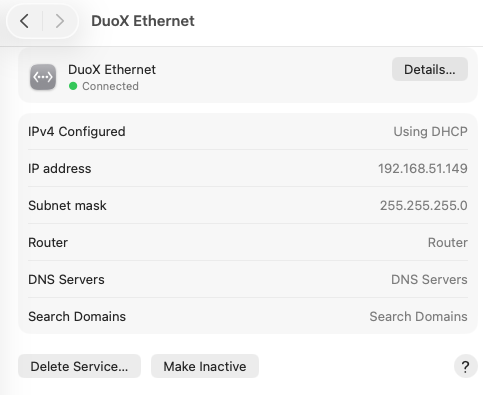
For example, in my network systems tab, there were multiple Mod devices, and none worked, so I deleted them all. Rebooted computer - connected MDX, and saw nothing in the Network panel, so I created a new item - it found the ModDuoX and I created that, and it says ‘connected’. Using other USB ports, I can see that this network item connects via all the ports I tested, so that element is working.
It is weird to me that Mac calls this an “ethernet” connection, as I’m using USB.
In any case, no attempt to connect to the webgui using Chrome or Safari worked, using either http://modduox.local (or http://192.168.51.1).
This is what my network settings look like. Does this make sense so far?