MOD,
I have created 2 new plugins specifically for bass guitarists:
* JTBassSynth - Monophonic pitch-tracking bass synthesizer modeled on MXR-style bass synth pedals: eight voices, resonant ladder filter with envelope sweep, attack swell, glide and independent dry/synth levels. GitHub - jtemple967/JTBassSynth · GitHub
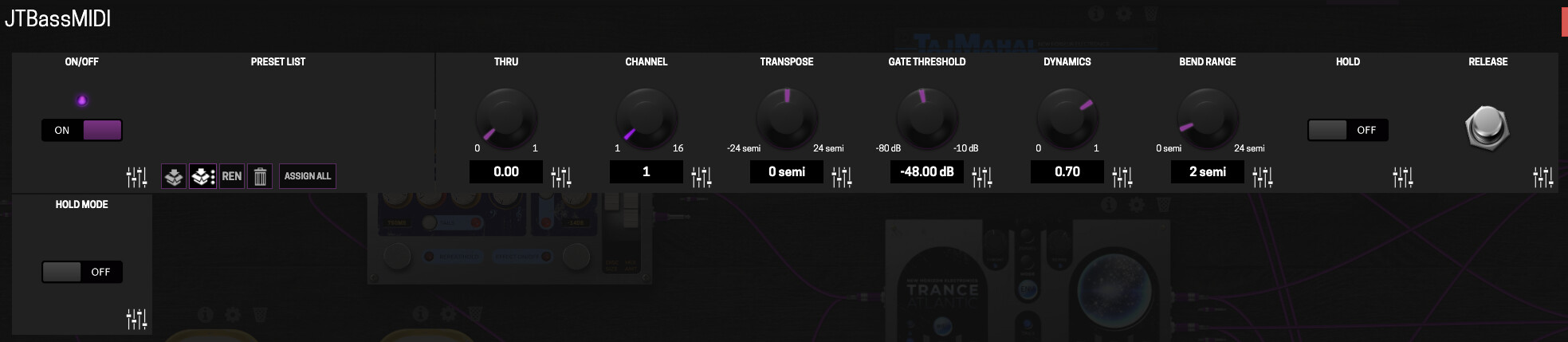
* JTMassMIDI - Monophonic bass-to-MIDI converter. Tracks the pitch of a bass guitar and sends MIDI notes with velocity and optional pitch bend. The audio passes through, so it can sit inline on a pedalboard. There’s a “Hold” mode where you can play a note and either have it hold indefinitely until you press the “Release” button or have the note change whenever you change notes on the bass. Either way, the note just holds with no decrease in sound. So you could add pads to the background of your song. GitHub - jtemple967/JTBassMIDI · GitHub
I’d like to make sure these are available for the MOD community. Not sure how to upload plugins or if those go through a specific process to get into the plugin site. Either way, happy to have them included if approved.
7 Likes
I’ll be keen to get that bass synth installed so i can have a go! Thanks. 
1 Like
I’m no authority on this, just a random punter (as the Brits might say), but I had success with the MOD Cloud Builder and the ‘Create Shareable Persistent Build’ option.
http://builder.mod.audio/buildroot
It’s just that you can only upload the .mk file so it will need to reference your repo and not local files.
There may be helpful info here: Using buildroot - MOD Wiki
1 Like
And the bass synth tracks even guitar pretty well. You just have to play cleanly and think like a key, not a string.
Super fun.
Is it better to use the Bass MIDI unit into the Bass Synth? I was just using the Synth alone and had good results. Though I had to put a stern limiter on it to avoid some crazy volume spikes here and there.
I would not run the bass synth into bass midi, it would add too much latency. The bass midi plugin is really designed to pass midi into synth plugins.
OK, yeah, that’s how I used them. But as they appeared to be “paired” together, I wasn’t sure if you intended that.
Any chance of getting a cloud-builder link or .mk file of these? I’ve never actually installed a .lv2 onto my DuoX or Dwarf-- would also take a reminder of how to do this on a Mac (I know this is already out there somewhere on the forums so a link to that would also be great if anyone remembers). Anyway, I’m excited to try both of these, I’m currently using GxTuner to send midi but it’s a little clunky…
I unfortunately won’t be able to do that. I don’t use a MOD device but wanted to make my plugins available to MOD platform.
Cloud builder shared install for JTBassSynth:
https://builder.mod.audio/install/1hkm5l8r
Cloud builder shared install for JTBassMidi:
https://builder.mod.audio/install/_7p_k_vm
Note on the Midi plugin:
This plugin sends MIDI. The cookbook says its recipes don’t cover MIDI input or output, so nothing like this has been validated on the builder. DPF itself supports MIDI output, so it was wired that way.
Main risk
Port numbering assumes DPF’s LV2 wrapper puts the MIDI-out port at index 2 and the control ports from 3 onward. If the pinned DPF version orders them differently, controls could be wired to the wrong parameters. The plugin would still load. But there’s a risk the knobs behave oddly or no MIDI comes out.
Edit: Both installed and tested on a MOD Duo and they both work great! @jtemple0967 @oeSmash
I ran the midi into the FluidStrings along with the dry signal to get a Faux Double Bass sound. Very cool  Thanks so much for sharing.
3 Likes
@Whythisreason thanks for taking care of that! And super excited that it’s working on the Duo!
I used Fluid Synth as well and next want to try out the plugins for sf2 and sfz synth files.
1 Like
Essentially just pointed a free version of Claude in Chrome at the url of your Github repos and the repo for the MOD Cookbook and asked to create the .mk files. Zero issues, apart from the midi warning.
I haven’t tested the “hold” “release” and “hold mode” functions yet, but it tracked really well and hooked up to FluidStrings immediately. I play Bass as well so this is a very welcome set of plugs. 
1 Like
@Whythisreason the hold usage is very specific and admittedly tailored to my needs. In Note mode, a new note on is sent until you play another note. So, for example, if you played an E then started playing 8th notes on the same note, the plugin would not emit a note on for each subsequent 8th note. So you, as a bass player could add some pads or such to the song. In latch mode the first note you play is emitted and doesn’t change regardless of subsequent notes. In either mode the release button stops the current midi note.
1 Like
Right, cool. So where it currently states “hold mode” in the settings, the on/off should actually say “note/latch” where “note” keeps the note until you change to a different note, and latch takes the incoming note and ignores everything until you manually release it. I just tried it now That’s really interesting and opens up some cool playing possibilities for sure!
Good points. I will make that clearer
1 Like
Just pushed an up date to the JTBassMIDI plugin to hopefully clarify the “Hold Mode” setting on the plugin parameters page.
2 Likes
Just uploaded an update to the JTBassMIDI plugin. I added a “Stacked” mode to the Hold feature of the plugin. In this mode the plugin will “stack” up to 3 notes together. In this mode you need to play but not hold the notes on your bass. Short notes played in quick succession.