Ciao Rino
nella confezione del Chocolate che ho ricevuto oggi, l’unico cavo incluso ha connessione USB per PC su un’estremità e tipo C sull’altra. Comunque grazie 1000, lo cerco in negozio
In my Chocolate’s package there’s only the standard PC type USB plug to C plug ends kind of cable. Anyway thanks a lot for the prompt answers!
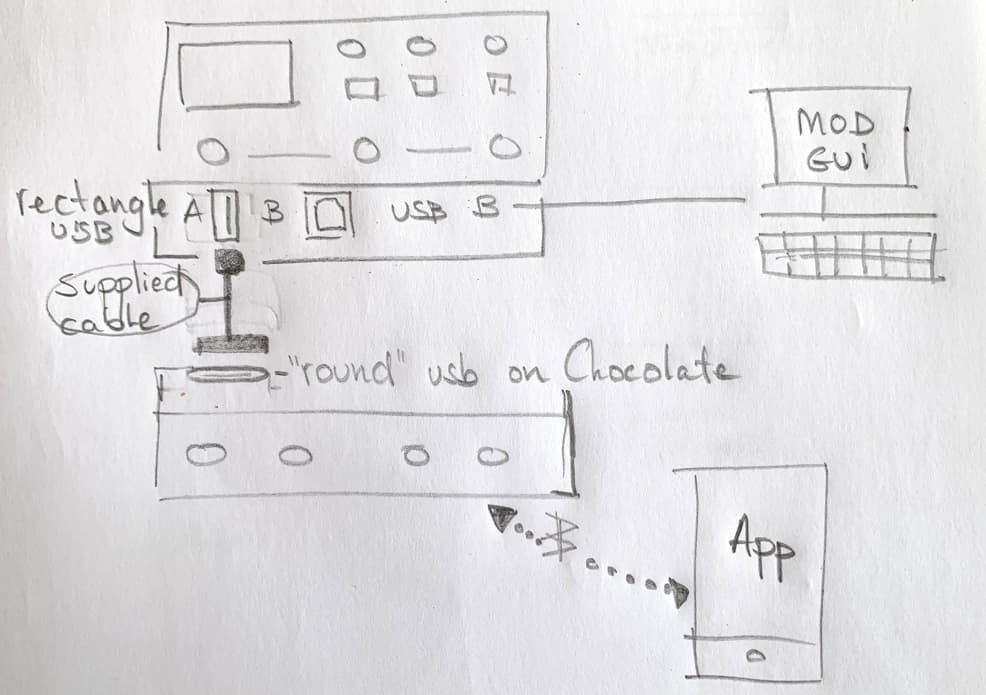
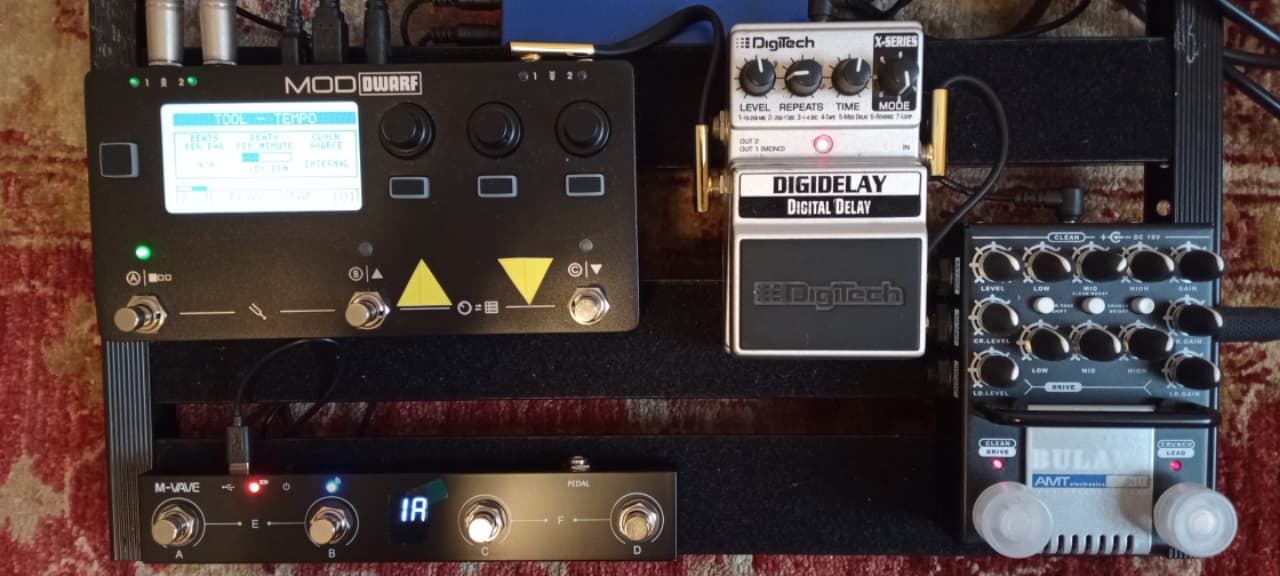
This is how my setup looks like, using the provided cable that came with the Chocolate.
I use an app (voa bluetooth) to do the settings on the Chocolate
I mage the Dwarf via my windows pc; connected with the usb B (square) to usb A (pc) cable MOD provided with my Dwarf
Ah! Thank you Lieven and Bleo, very supportive
Not having the Dwarf with me right now, my memory suggested it has kind of A type of USB port but I was wrong
Good news then, you make me saving few bucks!
Like Lieven, my goal is to control 4 to 6 snapshots by the Chocolate, leaving the dwarf in the tuner/tap tempo mode. Frankly I don’t know if it is possible but I’ll check it out next days
It has a USB A port indeed, as well as a B. The A is the one you use to connect the Chocolate (with the supplied cable) or a USB hub. The B is for the connection to the computer. https://wiki.mod.audio/wiki/Dwarf_Technical_Specs#USB
You can actually browse more than 4 snapshots with your current setting. On the Chocolate, press F (C+D) to access the next bank of 4 buttons and E (A+B) to go to the previous one.
So:
connected the Dwarf and Chocolate by usb cable provided by M-Vave
set Dwarf settings–>midi–>PC snapshots channel 1
installed the Chocolate app using the QR printed on the device’s back
opened the app, verified that the pedalboard was using the same channel 1 (it already was) and set on Program Change A
et voilà, it started working flawlessly! 1A recall snapshot n. 1 on the specific pedalboard’s snapshot list, 2B ss n. 2, 2A ss n. 5 and so on
Awesome! Now I can giggin’ with it
Thank you guys
Thanks Kim
And differently from Headrush Pedalboard and Ampero I own and use too, I appreciate the analog feeling, tone, real amp kind of dynamic response the Bulava preamp delivers
Not to mention the joy to immediately modify the tones just reaching all the pots on it (no enter, change setting, save, exit menus you know)
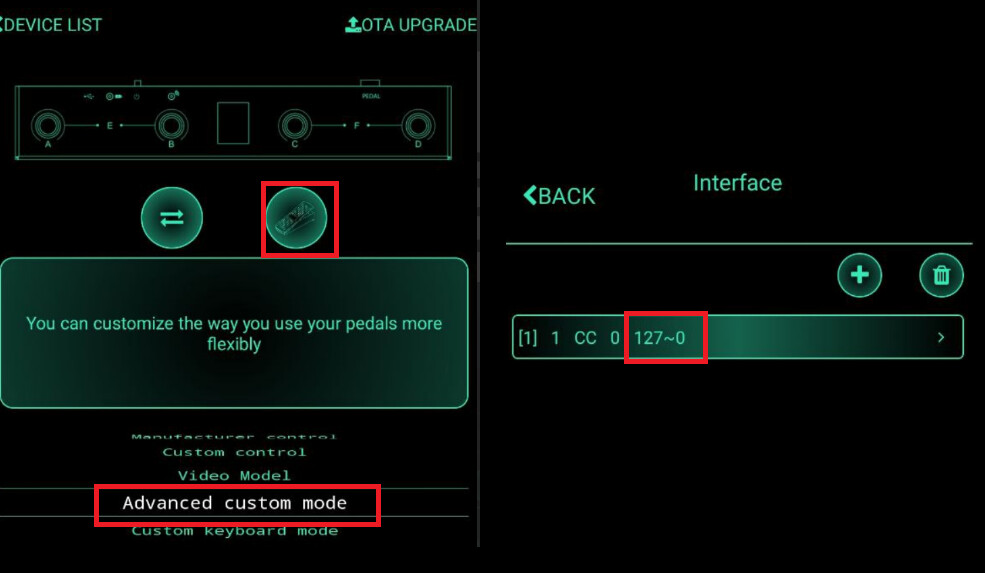
I need to change the direction… better invert the data sent by expression oedal connected to Chocolate.
Actually he sent 0 when it’s down and 127 on up (or the opposite I don’t gave the device in front of me)
This is because I must replicatw the same movemt of my real whammy, but on chicokate it’s opposite.
Also I know the now it’s possible to do internally in the app but… well I’m new (or quite) in midi command.
Can someone help me…I’m using chanbel 16…
I have another question. It’s strange but probably this is a limit of Chocolate or of the midi connection.
I’ve assigned the expression pedal to the whammy plugin, it correctly work now and also I have saved the configuration in the User setup.
When I load the whammy plugin in a pedalboard the setup is on default and not the saved one… if I recall the User saved setup, all the data are correctly recalled BUT NOT the midi assignment. I must press the double arrow, select midi and moving the expression pedal, after that the correct assignment is completed.
NOTE: this happens with all the plugin I have tested (wah-wah, volume control, etc.)
@Rino2 did I get it well that this happens when you drop a new time whammy (or any other effect) in a new pedalboard or simply another instance of it?
If yes, that is expected behavior since the assignments are not done on a plugin basis, yet on a pedalboard basis. So if you create a new pedalboard using plugins that you’ve used and assign controllers for it before, you will need to do it again.
Just got myself a Chocolate, too.
Nice little toy and quite nice for that ridicoulously low price.
I have an addition to the great instructions by @SrMouraSilva :
A little change in the section “Control an effect with the MIDI and the Mod Dwarf Footswitch” makes it possible to use both controls independently:
Set the CV logic Operator to “XOR” instead of “OR”.
(This means output is “on” only when exactly one of the two “Control to CV” is on and the other is off, and output is “off” when both Control to CV are “on” or both are “off”.)
Now any press of either the Dwarf footswitch or the Chocolate Switch will toggle the state of the controlled plugin.
Of course the problem of missing visual feedback remains, but we had that before anyway…
I have a chocolate too. I use it for switching snapshots with program change commands. The chocolate is in program change mode.
The program change command is send when I release the foot switch of the chocolate. Has anybodyelse this behavior too? Does anybody know, if it is possible to send program change commands directly with a down press of a foot switch of the chocolate?
In advanced custom mode, set the footswitch option to “Mode: Step short or step long”, this allow you to set messages on step on and step off, just leave de step off empty.
Best,