Yes, I’ve done all of the above. I’ve tried both the Aggregated mode and Separated mode as well as clicked on the check box even though it doesn’t say Arduino there. I can’t remember what it does say but I’ll edit this post when I get back to my studio.
Well, I don’t know. That check box is still there saying “USB Gadget Midi 1 (in+out)” whether I boot the Dwarf with the USB expression pedal or not. And I still can’t get the expression pedal to control anything.
It looks like you need to test your pedal to make sure it is working. You say that
but Macs see hardware IDs of non-functioning equipment – it can see the hardware ID of a drive that won’t mount, for instance.
I’d suggest you test your pedal outside of Dwarf to begin with. Use an app such as Snoize’s Midi Monitor and check on your Mac if the pedal outputs any midi data.
Also, check if the dip switches of your pedal are on the appropriate position.
(Did you acquire this pedal second-hand, by any chance? I’m asking because they were prone to fail and Crumar discontinued them. It shows “Arduino” on your Mac but “USB Gadget Midi” on your Dwarf, and that’s not a good sign.)
If your pedal outputs proper midi data through the proper channel and your Dwarf still doesn’t see it, then reach out to support at
It was an “Open Box” unit and I too am suspecting it might be the pedal now. I’m returning it as I did order a couple of different USB to MIDI adapters - something told me that I should. I just hope one of them works.
That is the internal MIDI of the Dwarf.
If your pedal is not listed there and you can’t map it, most likely it’s an issue with the pedal. The platform is fairly simple mapping MIDI and that is totally explained in the wiki.
In my tests, in order for the “Check Box” representing your pedal to disappear once you have disconnected it from the USB port, you have to change to Aggregated and back to Separated Modes. I think there is a refresh issue in this configuration window.
Well, the Doremidi Midi Converter works. I can assign whatever pedal puts out to a gain plugin and control it with the pedal. That’s great. However, it is super rough and makes the Gain plugin go from zero to full blast. Anybody have any suggestions on how to make the incoming data smoother and to limit its CC value range so that it can’t go full blast?
Cool that your problem seems to get a good ending !
Do you mind if I rename this thread so it could be found by others who would face the same difficulties ?
I hope it’s solved. I haven’t tried the suggestions yet and I’m still concerned about how jittery the volume swells sound. I’ll tinker with it when I can and give a report.
@Gino Hey, just curious, did you end up returning the Crumar pedal? Does it not work without the USB-Midi adapter? It’s not really clear in the sales description if it sends midi data or just has midi channels available…
I did send it back. It didn’t seem to work at all. I haven’t had a chance to go and see if I can smooth out the CC messages being sent by the Doremidi device. It works but it’s not all that usable.
I believe that @Gino at the time discovered that the Crumar was not sending proper MIDI data. If it doesn’t work also with Windows or MacOS reach out to their support, we can’t help you much here about that Sorry
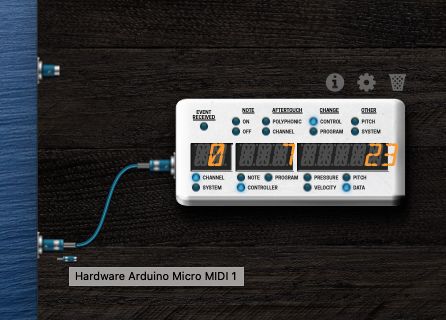

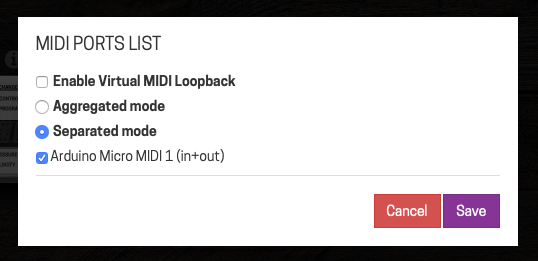

 thanks
  Sorry
Sorry